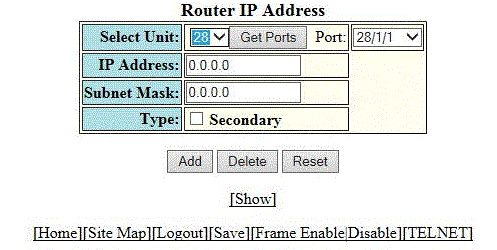
Configuring the system IP address
To configure the IP address of the system, perform the following steps.
- Click Configure on the left pane and select System .
- Click IP Address . The Router IP address window is displayed.
- Click Add IP Address.
- Select a Unit ID from the
Select Unit list and click
Get Ports to retrieve the list of ports corresponding to the selected Unit ID.
A message is displayed to indicate that the operation does not change the running configuration.
- Select a port from the Port list.
- Type the IP address of the device in the IP Address field.
- Type the network mask for the IP address in the Subnet Mask field.
- Select the Secondary check box for Type if you have already configured an IP address within the same subnet on the interface.
- Click Apply .