To display the inline power details, select the unit ID in the Select Stack POE Unit ID list and click
Inline Power Details .
The Inline Power Details window is displayed as shown in the figure below.
Monitoring inline power details
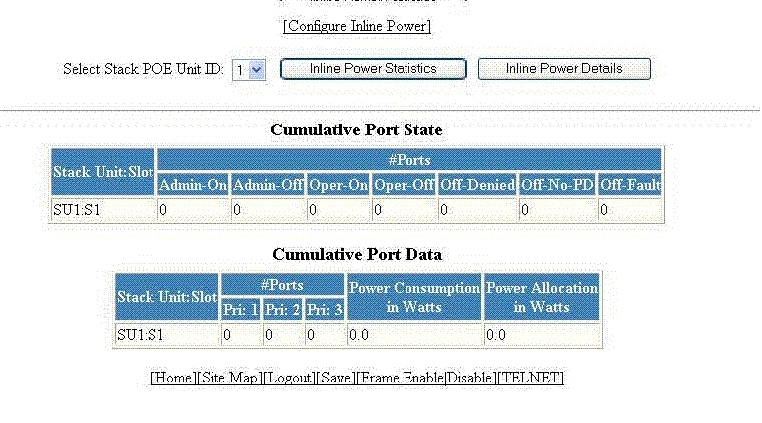
Description of the fields in the Inline Power Details window
|
Field
|
Description
|
|
Cumulative Port State parameters
|
|
Stack Unit: Slot
|
Displays the stack ID and slot ID (1 or 2).
The PoE-capable slots are available on PoE stack units.
|
|
# Ports Admin-On
|
Displays the number of ports on the interface module on which the inline power was
configured.
|
|
# Ports Admin-Off
|
Displays the number of ports on the interface module on which the inline power was
not configured.
|
|
# Port Oper-On
|
Displays the number of ports on the interface module that are receiving inline power
from the PoE power supply.
|
|
# Port Oper-Off
|
Displays the number of ports on the interface module that are not receiving inline
power from the PoE power supply.
|
|
# Ports Off-Denied
|
Displays the number of ports on the interface module that were denied power because
of insufficient power.
|
|
# Ports Off No-PD
|
Displays the number of ports on the interface module to which no powered devices
(PDs) are connected.
|
|
# Ports Off-Fault
|
Displays the number of ports on the interface module that are not receiving power
because of a subscription overload.
|
|
Cumulative Port Data parameters
|
|
Stack Unit: Slot
|
Displays the stack ID and slot ID (1 or 2).
The PoE-capable slots are available on PoE stack units.
|
|
# Ports
|
Displays the total number of available ports in each level of priority.
|
|
Power Consumption in Watts
|
Displays the total number of watts consumed by both PoE power-consuming devices and
the PoE module (daughter card) attached to the interface module.
|
|
Power Allocation in Watts
|
Displays the number of watts allocated to the interface module PoE ports. This value
is the sum of port default or configured maximum power levels, or power classes automatically
detected by the PoE device.
|