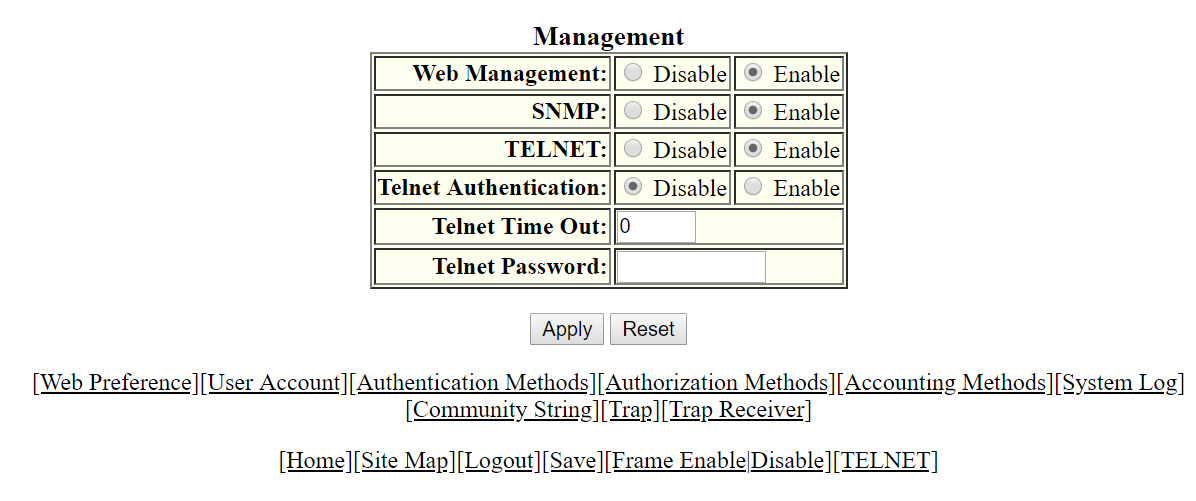
Configuring the general management parameters
To configure the general management parameters, perform the following steps.
- Click Configure on the left pane and select System .
- Click Management and select General .
- Click Disable or Enable for Web Management .
- Click Disable or Enable for SNMP .
- Click Disable or Enable for TELNET .
- Click Disable or Enable for Telnet Authentication .
- Type the timeout interval in seconds to wait for a response in the Telnet Time Out field.
- Type an alphanumeric password in the Telnet Password field.
- Click
Apply .
The message The change has been made is displayed. To reset the data entered in the configuration pane, click Reset .
The Management window provides links to configure other management parameters:
- To configure the web management preferences, click Web Preference . For more information, refer to Configuring the web management preference.
- To configure a management user account, click User Account . For more information, refer to Configuring a management user account.
- To configure management authentication, click Authentication Methods . For more information, refer to Configuring management authentication.
- To configure management authorization, click Authorization Methods . For more information, refer to Configuring management authorization.
- To configure management accounting, click Accounting Methods . For more information, refer to Configuring management accounting.
- To configure a system module, click System . For more information, refer to Configuring a system module.
- To configure an SNMP community string, click Community String . For more information, refer to Configuring a system module.
- To configure a trap, click Trap . For more information, refer to Configuring a trap.
- To configure a trap receiver, click Trap Receiver . For more information, refer to Configuring a trap receiver.