To view current Rapid Spanning Tree Protocol (RSTP) information for a device, you
must configure RSTP. For more information on how to configure RSTP, refer to
Monitoring RSTP. By default, RSTP is enabled on Layer 2 switches and disabled on Layer 3 switches.
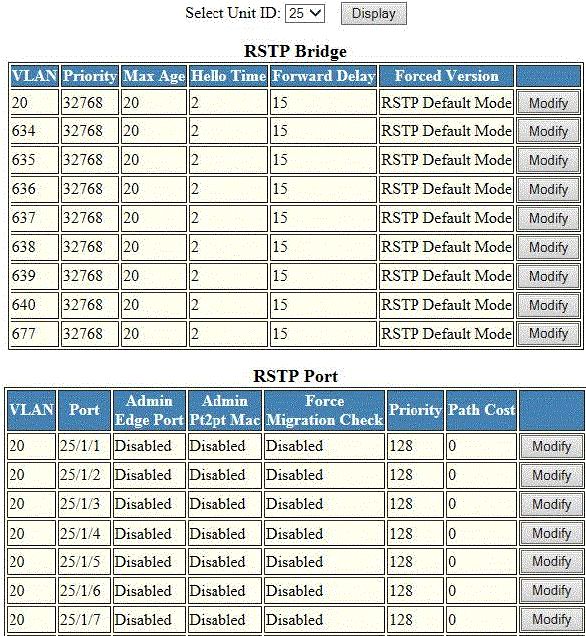
To display RSTP bridge and port information, click
Monitor on the left pane and select
RSTP .
The RSTP window is displayed as shown in the figure below. Select a Unit ID from
the
Select Unit ID list and click
Display to view the RSTP parameters of a specific port.
Monitoring the RSTP bridge and port
Description of the fields in the RSTP window
|
Field
|
Description
|
| Select Unit ID
|
|
|
RSTP Bridge parameters
|
|
VLAN
|
Displays the port-based VLAN that owns the STP instance. VLAN 1 is the default VLAN.
If you have not configured port-based VLANs on this device, all RSTP information is
for VLAN 1.
|
|
Priority
|
Displays the configured priority.
|
|
Max.Age
|
Displays the number of seconds this device or VLAN waits for a Hello message from
the root bridge before deciding the root has become unavailable and performing a reconvergence.
|
|
Hello Time
|
Displays the duration (secs) between two Hello packets.
|
|
Forward Delay
|
Displays the number of seconds a non-edge designated port waits until it can apply
any of the following transitions, if the received RST BPDU does not have an agreed
flag:
- Discarding state to learning state
- Learning state to forwarding state
When a non-edge port receives the RST BPDU, it goes into forwarding state within
4 seconds or after two hello timers expire on the port.
Forward delay is also the number of seconds that a root port waits for an RST BPDU
with a proposal flag before it applies the state transitions listed above.
If the port is operating in 802.1D-compatible mode, then forward delay functionality
is the same as in 802.1D (STP).
|
|
Forced Version
|
Displays the configured force version value, which can be one of the following:
-
0 --The bridge has been forced to operate in an STP compatibility mode.
-
2 --The bridge has been forced to operate in an RSTP mode. This is the default.
|
|
RSTP Port parameters
|
|
VLAN
|
Displays the port-based VLAN that owns the STP instance. VLAN 1 is the default VLAN.
If you have not configured port-based VLANs on this device, all RSTP information is
for VLAN 1.
|
|
Port
|
Displays the port number - stack-unit/slotnum/portnum.
|
|
Admin Edge Port
|
Displays whether the port is configured as an operational edge port:
-
T --The port is configured as an edge port.
-
F --The port is not configured as an edge port. This is the default.
|
|
Admin Pt2pt Mac
|
Displays whether the point-to-point-MAC parameter is configured to be a point-to-point
link:
-
T
-- The link is configured as a point-to-point link.
-
F --The link is not configured as a point-to-point link. This is the default.
|
|
Force Migration Check
|
Displays whether the port is enabled or disabled to forcefully send one RST BPDU.
If only STP BPDUs are received in response to the send RST BPDU, then the port will
return to sending STP BPDUs.
|
|
Priority
|
Displays the configured priority of the port. The default is 128 or 0x80.
|
|
Path Cost
|
Displays the configured path cost on a link connected to this port.
|