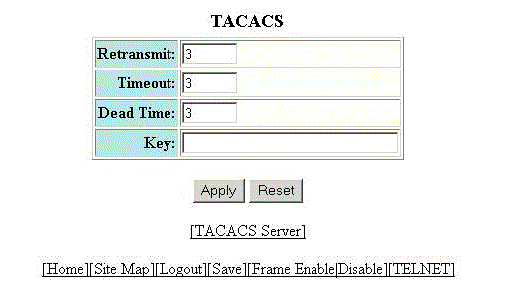
Configuring a TACACS/TACACS+ server
To configure a TACACS/TACACS+ server, perform the following steps.
- Click Configure on the left pane and select System .
- Click Tacacs .
- Type the retransmission interval, which specifies how many times the RUCKUS device resends an authentication request when the TACACS/TACACS+ server does not respond, in the Retransmit field. The range is from 1 through 5 times. The default is 3 times.
- Type the timeout interval, which specifies how many seconds the RUCKUS device waits for a response from a TACACS/TACACS+ server before either retrying the authentication request or determining that the TACACS/TACACS+ servers are unavailable and moving on to the next authentication method in the authentication method list, in the Timeout field. The range is from 1 through 15 seconds. The default is 3 seconds.
- Type the dead interval, which specifies how long the RUCKUS device waits for the primary authentication server to reply before deciding the server is dead and trying to authenticate using the next server, in the Dead Time field. The range is from 1 through 5 seconds. The default is 3 seconds.
- Type the TACACS/TACACS+ key in the Key field. This is used to encrypt TACACS/TACACS+ packets before they are sent over the network. The value for the key parameter on the RUCKUS device should match the one configured on the TACACS/TACACS+ server. The key can be from 1 through 32 characters in length and cannot include any space characters.
- Click Apply .