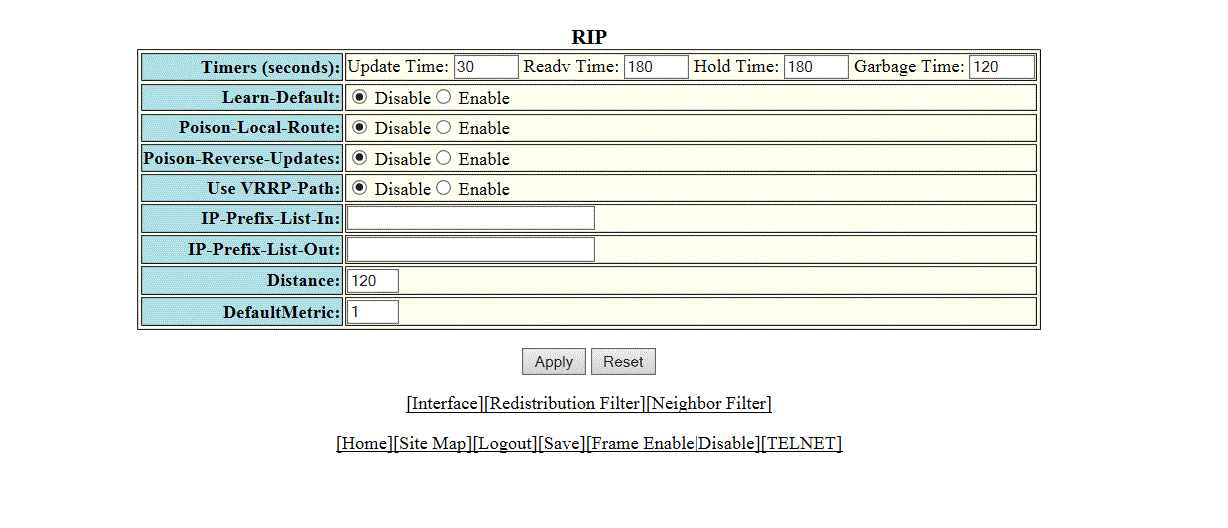
Configuring the general RIP settings
To configure the general RIP settings, perform the following steps.
- Click Configure on the left pane and select RIP .
- Click General .
- Configure the timer settings in the
Timers (seconds).
- Update Time: Sets the amount of time between RIP routing updates. The default is 30 seconds. Possible values are 3 through 21845 seconds.
- Hold Time: Sets the amount of time during which information about other paths is ignored. The default is 180 seconds. Possible values are 0 through 65535 seconds.
- Garbage Time: Sets the amount of time after which a route is removed from the RIP routing table. The default is 120 seconds. Possible values are 0 through 65535.
- Click Disable or Enable for the Learn-Default parameter that determines learning of default RIP routes.
- Click Disable or Enable for the Poison-Local-Route parameter that determines avoiding routing loops by advertising local RIP routes with a cost of 16 ("infinite" or "unreachable") when these routes go down.
- Click Disable or Enable for the Poison-Reverse-Updates parameter that determines poison reverse loop prevention, by assigning by assigning an "unreachable" cost to a route before advertising it on the interface where the route was learned.
- Click Disable or Enable for the Use VRRP-Path parameter that suppresses RIP route advertisement on a VRRP or VRRPE backup interface.
- Specify the prefix list to be applied to the routes, the device learns from its neighbors in the IP-Prefix-List-In field.
- Specify the prefix list to be applied to the routes, the device advertises to its neighbors in the IP-Prefix-List-out field.
- Specify the administrative distance that the RIP router adds to routes in the Distance field. By default, the RIP router assigns the default RIP administrative distance (120) to RIP routes.
- Change the RIP metric the router assigns by default to redistributed routes in the DefaultMetric field. By default, a metric of 1 is assigned to each route that is redistributed into RIP.
- Click
Apply .
The message The change has been made is displayed. To reset the data entered in the configuration pane, click Reset .
The RIP window provides links to configure other RIP parameters:
- To configure a RIP interface, click Interface . For more information, refer to Configuring a RIP interface.
- To configure a RIP neighbor filter, click Neighbor Filter . For more information, refer to Configuring a RIP neighbor filter.