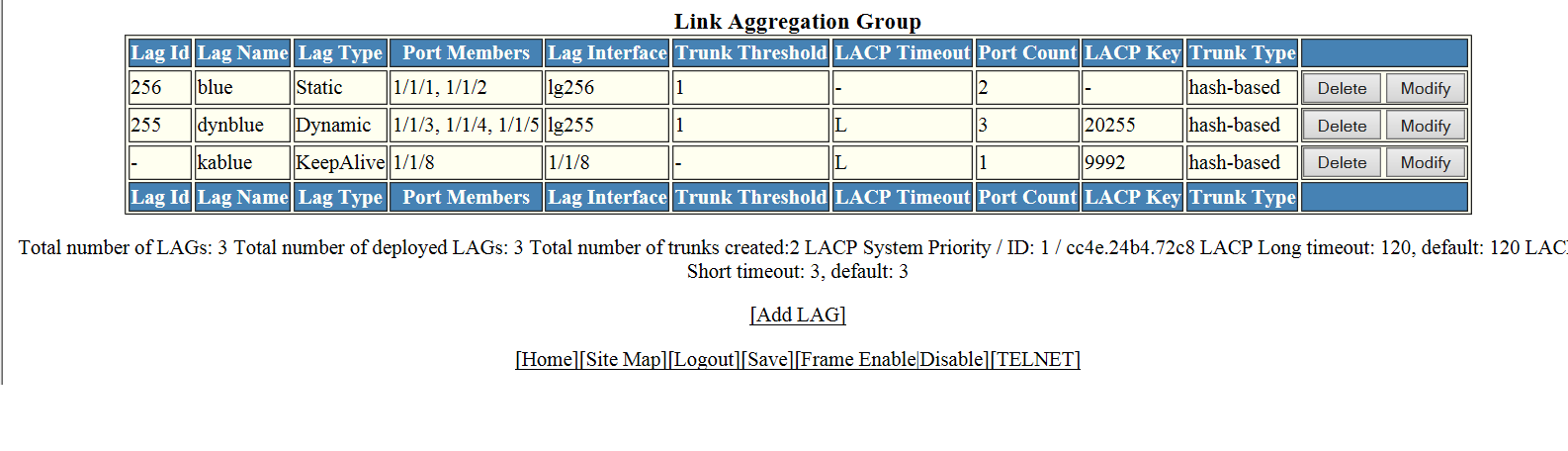
Displaying a configured LAG
You can display information for a configured link aggregation group (LAG). You can
also deploy, undeploy, modify, or delete configured LAGs.
To display LAG information, perform the following step.
- Click
Show in the
Configure LAG window.
This window has information fields for all LAG types; the fields are populated according to the LAG type, as follows:
- For static LAGs, the LACP Timeout and LACP Key fields display “–” because these parameters do not apply to static LAGs.
- For dynamic LAGs, the Trunk Threshold field displays “–” because this parameter does not apply to dynamic LAGs.