Displaying IP cache

Note: The IP cache is specific to Brocade ICX devices running Layer 3 code.

To display the IP forwarding cache information, perform the following steps.

  1. Click Monitor on the left pane and select IP .
  2. Click Cache .

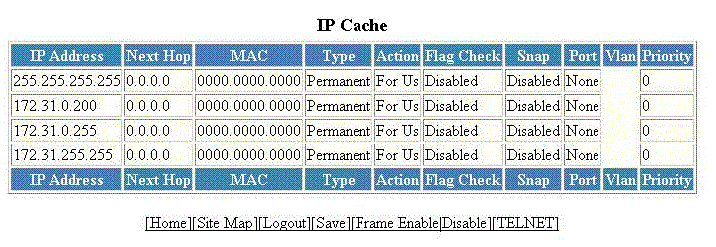
    The IP Cache window is displayed as shown in the figure below.

    Monitoring the IP cache

    Description of the fields in the IP Cache window
    Field

    Description

    IP Address

    Displays the IP address of the destination.

    Next Hop

    Displays the IP address of the next hop router to the destination. This field contains either an IP address or the value DIRECT. DIRECT means the destination is either directly attached or the destination is an address on this RUCKUS device.

    MAC

    Displays the MAC address of the destination.

    Note: If the entry is type Us (indicating that the destination is this RUCKUS device), the address consists of zeroes.

    Type

    Displays the type of host entry, which can be one of the following:

    • Dynamic
    • Permanent
    • Forward
    • Us
    • Complex Filter
    • Wait ARP
    • ICMP Deny
    • Drop
    • Fragment
    • Snap Encap

    Action

    Displays the action the router takes for the packet.

    Flag Check

    Displays whether the flag check has been enabled or disabled.

    Snap

    Displays whether the snap encapsulation has been enabled or disabled.

    Port

    Displays the port through which this device reaches the destination. For destinations that are located on this device, the port number is shown as "n/a".

    Vlan

    Displays the VLAN the port is in.

    Priority

    Displays the Quality of Service (QoS) priority of the port or the VLAN.