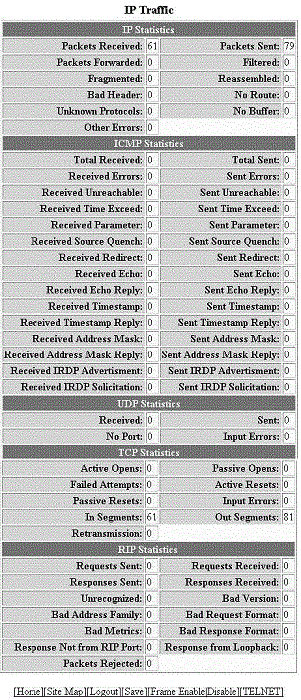
Displaying IP traffic information for devices running Layer 3 code
To display the IP traffic statistics for RUCKUS ICX devices running Layer 3 code, perform the following steps.
- Click Monitor on the left pane and select IP.
- Click
Traffic
The IP Traffic window is displayed as shown in the figure below.
Description of the fields in the IP Traffic window
Field
Description
IP Statistics parameters
Packets Received
Displays the number of IP packets received by the device.
Packets Sent
Displays the number of IP packets originated and sent by the device.
Packets Forwarded
Displays the total number of IP packets received by the device and forwarded to other devices.
Filtered
Displays the total number of IP packets filtered by the device.
Fragmented
Displays the number of IP packets fragmented by this device before sending or forwarding them.
Reassembled
Displays the number of fragmented IP packets received and re-assembled by the device.
Bad Header
Displays the number of IP packets dropped because they had a bad header.
No Route
Displays the number of packets dropped by the device because they had no route information.
Unknown Protocols
Displays the number of packets dropped by the device because the value in the protocol field of the packet header is unrecognized by this device.
No Buffer
Displays the number of packets dropped because the device ran out of buffer space.
Other Errors
Displays the number of packets dropped due to errors other than the ones already indicated in the IP Statistics parameters.
ICMP Statistics
Refer to Displaying IP traffic information for devices runningLayer 2 code.
UDP Statistics
Refer to Displaying IP traffic information for devices runningLayer 2 code.
TCP Statistics parameters
Active Opens
Displays the number of TCP connections opened by this device by sending a TCP SYN to another device.
Passive Opens
Displays the number of TCP connections opened by this device in response to connection requests (TCP SYNs) received from other devices.
Failed Attempts
Displays the number of failed attempts. This information is used by RUCKUS customer support.
Active Resets
Displays the number of TCP connections this device reset by sending a TCP RESET message to the device at the other end of the connection.
Passive Resets
Displays the number of TCP connections this device reset because the device at the other end of the connection sent a TCP RESET message.
Input Errors
Displays the number of incoming errors. This information is used by RUCKUS customer support.
In Segments
Displays the number of TCP segments received by the device.
Out Segments
Displays the number of TCP segments sent by the device.
Retransmission
Displays the number of segments that this device retransmitted because the retransmission timer for the segment had expired before the device at the other end of the connection had acknowledged receipt of the segment.
RIP Statistics parameters
Requests Sent
Displays the number of requests this device has sent to another Routing Information Protocol (RIP) Layer 3 switch for all or part of its RIP routing table.
Requests Received
Displays the number of requests this device has received from another RIP Layer 3 switch for all or part of this device’s RIP routing table.
Responses Sent
Displays the number of responses this device has sent to another RIP Layer 3 switch’s request for all or part of this device’s RIP routing table.
Responses Received
Displays the number of responses this device has received to requests for all or part of another RIP Layer 3 switch’s routing table.
Unrecognized
Displays the number of RIP packets that were not recognized by the device.
Bad Version
Displays the number of RIP packets dropped by the device because the RIP version was either invalid or is not supported by this device.
Bad Address Family
Displays the number of RIP packets dropped because the value in the Address Family Identifier field of the packet’s header was invalid.
Bad Request Format
Displays the number of RIP request packets this Layer 3 switch dropped because the format was bad.
Bad Metrics
Displays the number of responses to RIP request packets this Layer 3 switch dropped because of the bad metric value. This information is used by RUCKUS customer support.
Bad Response Format
Displays the number of responses to RIP request packets this Layer 3 switch dropped because the format was bad.
Response Not from RIP Port
Displays the number of RIP responses received from non-RIP ports. This information is used by RUCKUS customer support.
Response from Loopback
Displays the number of RIP responses received from loopback interfaces.
Packets Rejected
Displays the number of RIP packets rejected by the device.