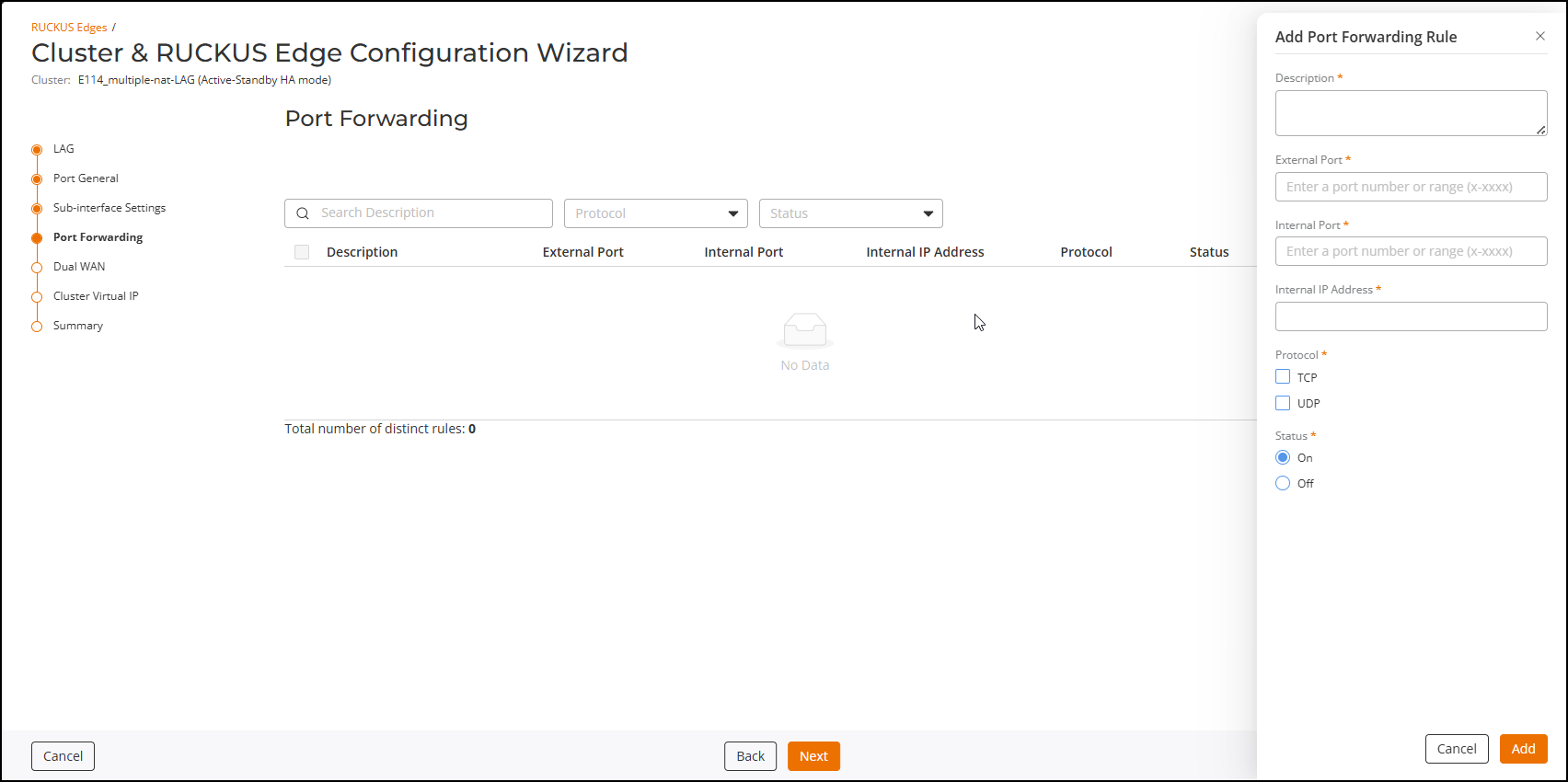
Port Forwarding Settings
- From the Port Forwarding page, click Add Rule.
- Configure the following:
- Description: Enter a distinct name for the rule.
- External
Port: Specify the port or port range on the Edge WAN
interface that external clients will use to connect.
Note: The number of ports in the internal port range must match the number in the external port range.
- Internal Port: Enter the port or port range on the internal server that will receive the forwarded traffic.
- Internal IP Address: Enter the IP address of the internal server.
- Protocol: Select one or both of the transport protocols:
- Status:
Select On to enable the rule or Off to
disable it.
Note: The system automatically uses the WAN interface IP as the external address when you add port forwarding rules. Therefore, no manual configurration of external IP is required.
- Click Add to save the configuration.
- (Optional) Repeat through , as necessary, to add up to 128 port forwarding rules.
- Click Next to continue
configuring the cluster ports and IP settings.The Dual WAN Settings page is displayed.