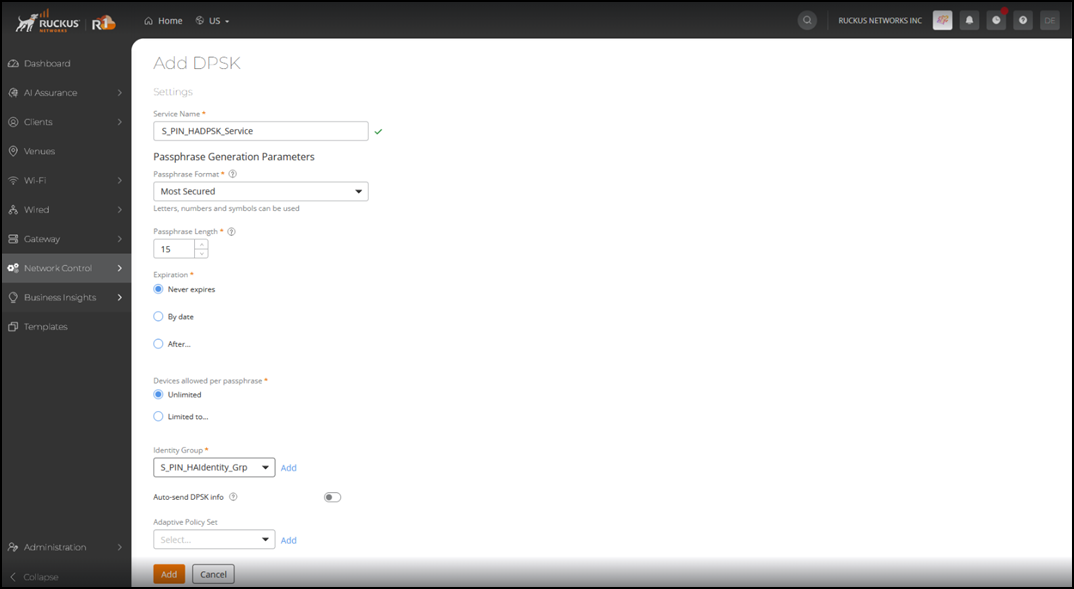
Adding DPSK Service for PIN
Dynamic Pre-Shared Key is an
encryption technology developed to provide robust and secure wireless access.
- On the RUCKUS One navigation
bar, select .This displays the Service Catalog page.
- Click Add in the
DHCP tile.This displays the Add DHCP Service page.
- Enter the following details:
- Under Settings, enter the service name.
- Under
Passphrase Generation Parameters, enter the
following details:
- Passphrase Format: Click on the drop-down menu and select a passphrase format.
- Passphrase Length - Enter the passphrase length. Valid range from 8 through 63.
- Expiration - Select an expiration type.
- Devices Allowed per Passphrase - Select the number of devices to be allowed per passphrase.
- Identity Group - Select the identity group from the drop-down list or click Add to create a new Identity Group. Refer to Creating a New Identity Group for more information.
- Auto-send DPSK info - Enable this option to automatically send DPSK credentials to users by email or SMS. For SMS, make sure an SMS provider is set up in.
- Adaptive Policy Set - Select the policy set from the drop-down list.
- Click Add. The newly created DPSK service is added to the list.