Adding Static Routes to Guest DMZ or L2GRE Destination Networks
In an Active‑Active Cluster deployment with the SD‑LAN service, traffic destined for the DMZ and L2GRE destination networks must be reachable through the core port configured on the Edge devices. In two‑leg deployments, the core and access ports are configured on separate interfaces, and the default route on each Edge node points to the access port.
To ensure that DMZ and L2GRE traffic is routed through the core port, configure static routes on the Edge devices. Static routes must be configured individually on each Edge in the cluster. If the static routes are misconfigured or missing, routing will fail and clients will not be able to connect to the network.
- On the RUCKUS One navigation
bar, select .This displays the RUCKUS Edge page.
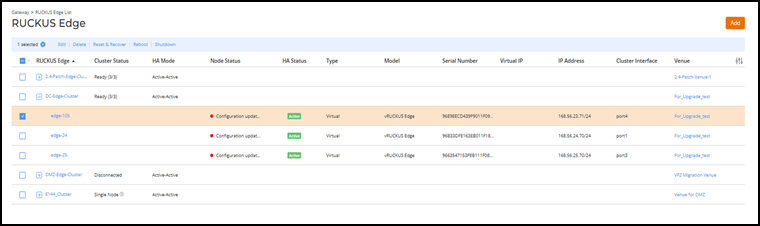
- Select one Edge in a cluster and click Edit.
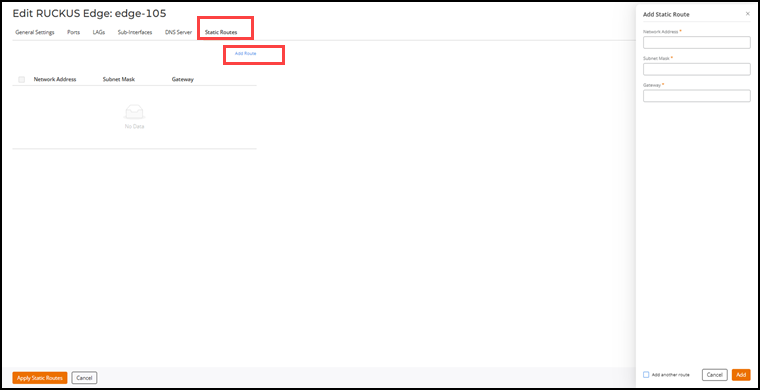
- Select the Static Routes tab and click Add Route.
- Enter the following information:
- (Optional) Click the Add another route checkbox if you intend to add more static routes. Every Edge node in the cluster should have at least one static route configured.
- Click Add.
- Click Apply Static Routes after all static routes are added.