Viewing an mDNS Proxy Service
You can view the detailed information
about any defined mDNS Proxy service.
- On the RUCKUS One navigation bar, select .
- Click the mDNS Proxy tile
and select the RUCKUS Edge tab.The RUCKUS Edge page is displayed.
Here you can quickly see a list of all defined mDNS proxy services, including the number of forwarding rules assigned to each service, and the number of venues to which each service is applied.
You can hover your cursor over the Forwarding Rules number to trigger a pop-up displaying the Type, the From VLAN, and the To VLAN for each associated rule.
You can hover your cursor over the Venues number to trigger a pop-up displaying the venue names for each associated rule.
- Click the required mDNS proxy
service name to view additional detailed information about it.
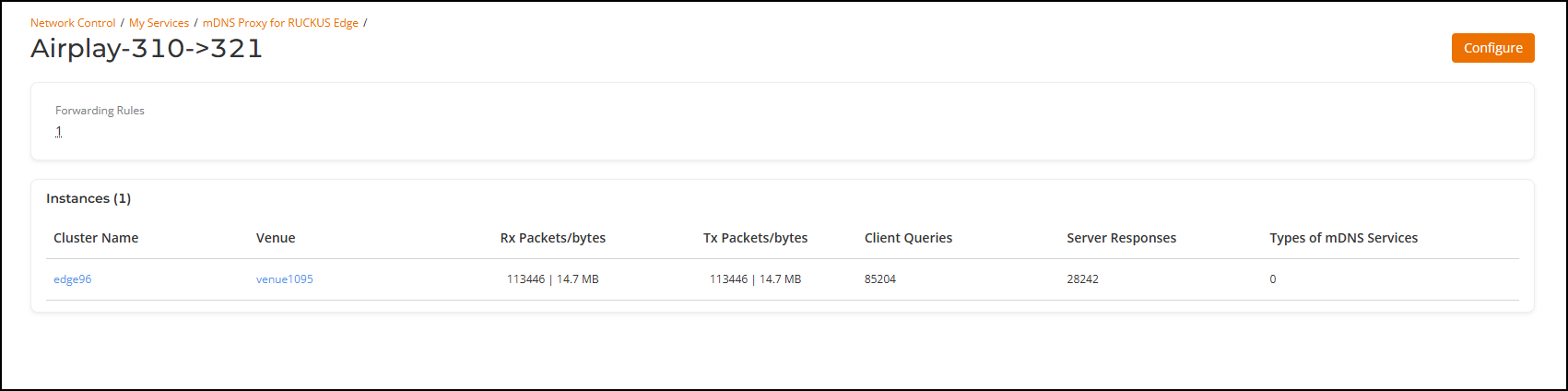
- The Forwarding Rules section displays the number of rules defined for the selected service. Hover your cursor over the number to trigger a pop-up displaying the Type, the From VLAN, and the To VLAN for each associated rule.
- The Instances section displays Cluster Name, Venue, Rx Packets/bytes, Tx Packets/bytes, Client Queries, Server Responses, and Types of mDNS Services.