Edge Delegation
Feature Overview
The Edge Delegation feature allows sharing of a RUCKUS Edge device cluster, its configuration, and its services across multiple end customers (ECs) within the purview of a Managed Service Provider (MSP).
The MSP administrator creates the Edge device cluster, venues, networks, tunnel profiles, and SD-LAN service within its own RUCKUS One tenant account. The MSP administrator creates a "reference" of the Tunnel Profile, Edge device, and SD-LAN service and shares the "reference" with multiple ECs; however, the MSP retains ownership of the Edge device and the SD-LAN service.
The EC administrators are granted read-only access to the Tunnel Profile configuration via their own RUCKUS One tenant portal. They cannot modify the Edge device, create new SD-LAN services, nor alter any aspect of the SD-LAN configuration. ECs do retain management control of their APs and AP Groups, allowing them to add or remove APs from networks that have the SD-LAN service enabled, thus controlling their integration into or removal from the SD-LAN service.
The benefits of Edge delegation include:
- Reduced MSP operational overhead by empowering campus administrators
- Assured compliance and security through controlled delegation
- Enhanced scalability for a large-distributed network
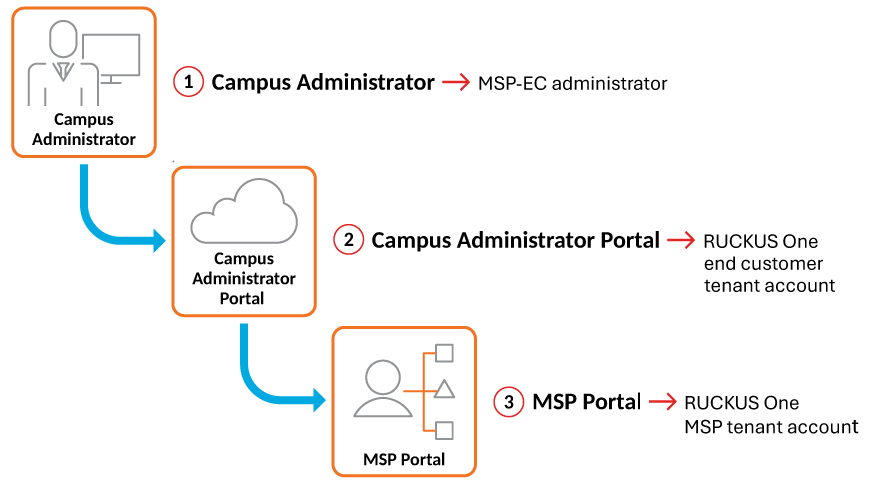
Edge Delegation Component
| Component | Description |
|---|---|
| MSP-EC Administrator or Campus Administrator | Administrator role responsible for managing the RUCKUS Edge cluster within the end customer tenant. |
| RUCKUS One End Customer Tenant Account or Campus Administrator Portal | Portal or interface for end customers to manage their network and Edge cluster devices. |
| RUCKUS One MSP Tenant Account or MSP Portal | Top-level portal for MSP to manage multiple end customer tenants and delegate roles. |
The Edge Delegation flow is as follows:
- MSP administrator logs into
the MSP Portal and defines delegation policies.
- Creates and manages the EC tenant account (if the Customer does not already exist).
- Defines delegation policies or role-based permissions (read-only, config, monitoring).
- Assigns campus administrators and configures RBAC roles.
- Delegated roles are pushed to the Campus Administrator Portal.
- Campus administrators receive credentials and access scope.
- MSP creates and publishes configuration templates.
- Campus administrators access the Campus Administrator Portal to manage local configurations, applying local policies within MSP-defined limits. For example:
- Edge devices sync with
delegated settings from the Campus Administrator Portal.
How often does this sync occur?
- MSP monitors changes and compliance via their centralized dashboard (accessed by using the Manage My Account function on the MSP Customers page).
Requirements
Limitations
Considerations
Consider the following when configuring and using this feature:
Best Practices
Here are some implementation best practices for the feature: