Supported AP Models
Supported AP Models for Release 2.1.0 provides a list of APs that are supported by RUCKUS Edge release 2.1.0.
Supported AP Models for Release 2.1.0
| IEEE Standard | Profile ID | Image Type | Supported AP Models |
|---|---|---|---|
| 802.11be | ap-arm-11beax | R770 | R770 |
| 802.11ax | ap-arm-11ax | R730 | R730, R750, R650, T750, T750SE, R850, R550, R760, R560 |
| ap-arm-cypress | H550 | H550, T350C, T350D, T350SE, R350, H350 | |
| 802.11ac Wave 2 | ap-arm-dakota | R510 | R320, M510, R510, H510, H320, E510, T310C, T310D, T310N, T310S |
| ap-arm-qca | R710 | R720, R710, R610, T710, T710s, T610, T610S | |
| 802.11ac Wave 1 | ap-11n-scorpion | T300 | R500, R600, R310, T300, T300E, T310N, T310S |
Incompatible AP Firmware
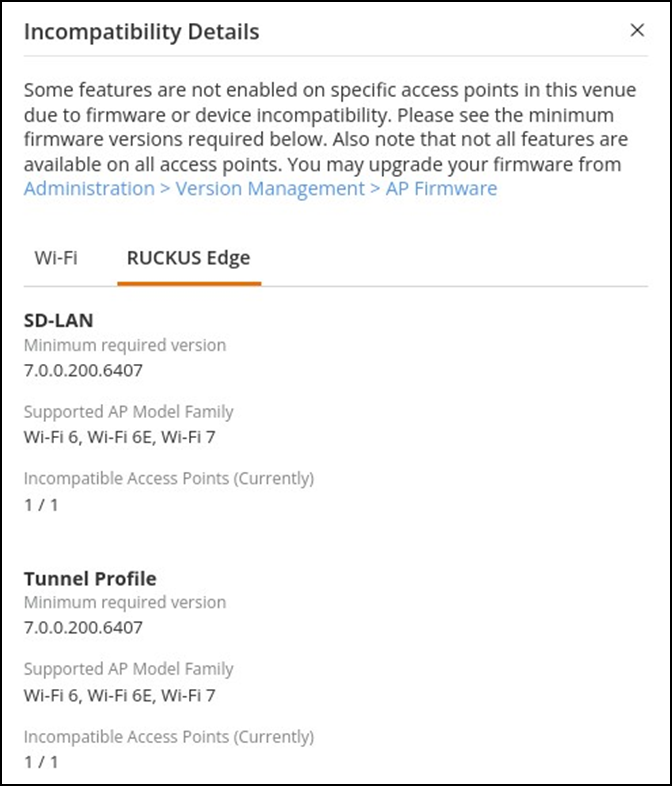
RUCKUS Edge version 2.1.0.971 supports APs with firmware version 7.0.0.200.6407 or later. Although APs with older versions are allowed in the venue, a VxLAN tunnel cannot be established. This triggers a warning message indicating the incompatibility of the AP firmware and recommending an upgrade. Only after upgrading the AP (such as through the RUCKUS One controller) a tunnel can be established between the AP and RUCKUS Edge.
To view the service impacted due to AP firmware incompatibility, navigate to the Venue in which the APs and Edges deployed and click the Devices tab (which automatically displays the Wi-Fi sub-tab). An error message is displayed on the top-right corner within the Wi-Fi sub-tab. Click See details, the Incompatibility Details widget is displayed, as shown in AP Firmware Incompatibility Warning Message. The warning message displays the service impacted, minimum version required to support, supported AP model, and the number of APs incompatible. To upgrade the AP firmware, go to and upgrade the firmware.