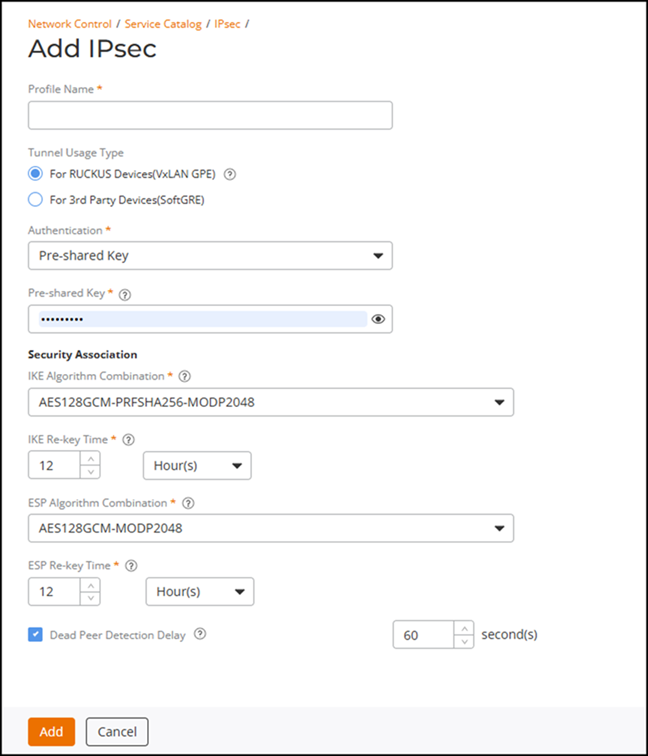
Creating an IPsec Profile
An IPsec profile is a configuration that
outlines how Internet Protocol Security (IPsec) is used to secure network communications
by
authenticating and encrypting each IP packet in a data stream.
To activate encryption for a VxLAN-GPE tunnel between AP and Edge, tunnel encryption needs to be activated and a configured IPSec Profile needs to be attached to SD-LAN Tunnel profile. The encryption of a VxLAN-GPE tunnel is not enabled by default.
- On the RUCKUS One navigation bar, select .
- Find the IPsec tile and click Add.
- Enter a unique name for the IPsec profile.
- For Tunnel Usage
Type, select the For RUCKUS Devices (VxLAN
GPE) option and complete the following fields:
- Authentication: Select Pre-shared key from the drop-down list.
- Pre-shared Key: Enter a secure key (8–64 characters) using standard printable characters. Do not include double quotation marks ("), backticks (`), a dollar symbol ($), or a left parenthesis (.
- Security
Association: Define the encryption and integrity
algorithms (proposal sets) used during IKE and IPsec Security
Association (SA) establishment.
- IKE Algorithm Combination: Specify the proposal sets for IKEv2 negotiation between peers. Select one of the predefined combinations from the drop-down list.
- IKE Re-key Time: Specify the interval at which IKE SAs are re-established to refresh session keys. You can define the interval in minutes, hours, or days. Default value is 12 hours. Valid ranges are:
- ESP Algorithm Combination: Specify the encryption and integrity algorithms used for the Encapsulating Security Payload (ESP) phase of the IPsec tunnel. Select one of the predefined combinations from the drop-down list.
- ESP Re-key Time: Specify the interval at which ESP SAs are rekeyed. You can define the interval in minutes, hours, or days. Default value is 12 hours. Valid ranges are:
- Dead Peer Detection Delay: If selected, monitors peer availability by periodically sending DPD probes to verify that the remote peer is reachable. This option is enabled by default. Valid value range for DPD timeout is 30 through 600 seconds. The default timeout value is 60 seconds. It is recommended to keep this option enabled.
For more information, refer to IPsec/IKE Encryption Support for VxLAN-GPE Tunnel.
- Click Add.