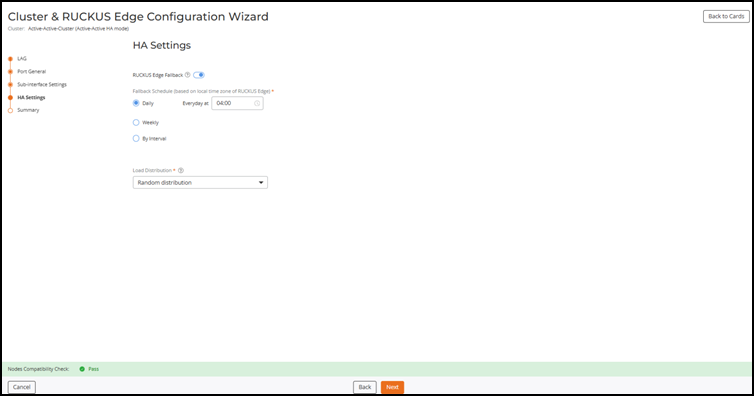
Configuring Fallback Schedule and Load Distribution Protocol
- From the LAG Settings page, click Next.
- Click Next.
- Click Next.
- Toggle the RUCKUS Edge Fallback option to enable the feature.
- Choose one the following
Fallback
Schedule options.
- Daily: Sets the fallback schedule for the specified time each day.
- Weekly: Sets the fallback schedule for the chosen day at the specified time.
- By Interval: Sets the
fallback schedule for the designated interval.
Note: The scheduled fallback time will align with the local time zone of the venue, ensuring the fallback operations occur at the correct local time.Note: Fallback scheduled time is not automatically adjusted for Daylight Saving Time. Therefore, when exiting Daylight Saving Time, the RUCKUS Edge device will trigger fallback an hour earlier than the scheduled time and while entering Daylight Saving Time, it will trigger fallback an hour later.
- Select the Load Distribution required from the following
drop-down options:
- Random distribution: All the APs have a different random list for Edge IPs.
- Per AP group distribution: All the APs in the same AP group will have the same random list of Edge IPs of the active-active cluster.
- Click Next.