Configuring Core and Access Port on the Same Interface
In a single‑leg deployment, the core and
access ports can be configured on the same interface. A LAG interface or an untagged
Ethernet interface (or its sub‑interface) can be used as both the core and access
port.
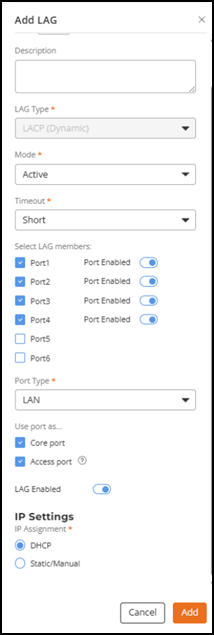
- From the LAG Settings page, click Add LAG from the right-corner of the screen.
- For Use port as, select both Core port and Access port.
- Click Add.
- Click Next.
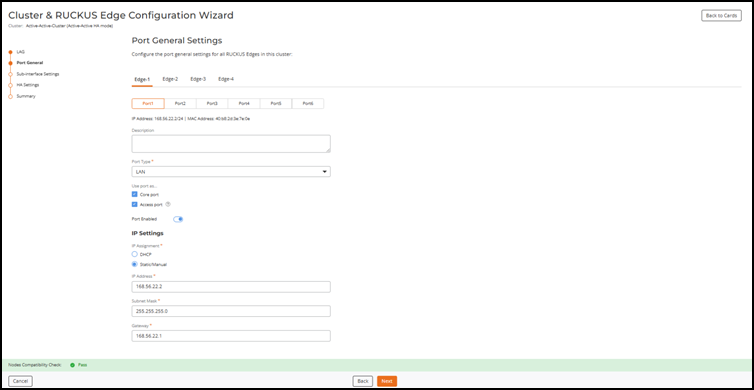
- For each Edge device in the cluster, select the Port Type as LAN, Use port as for both Core port and Access port, and enter the IP Address and Subnet Mask.
- On each Edge device, select an interface as cluster interface and assign static IP address. The cluster interfaces for all Edge nodes in a cluster must be the same interface type, either a physical port or a LAG.
- Click Next.
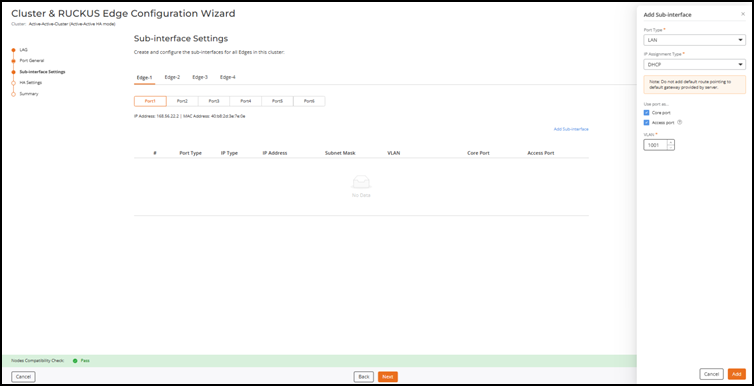
- Click on Add Sub-interface for the configured LAG interface.
- Enter the following details to configure access port and click
Add:
- Port Type - Select LAN from the drop-down list.
- Assignment Type - By default, the IP assignment type is DHCP, however, to manually configure the ports, select Static from the drop-down list and enter the IP address.
- Use port as: Select Core Port and Access Port
- VLAN: Enter the VLAN ID.
- Click Next untill the Summary page is displayed.