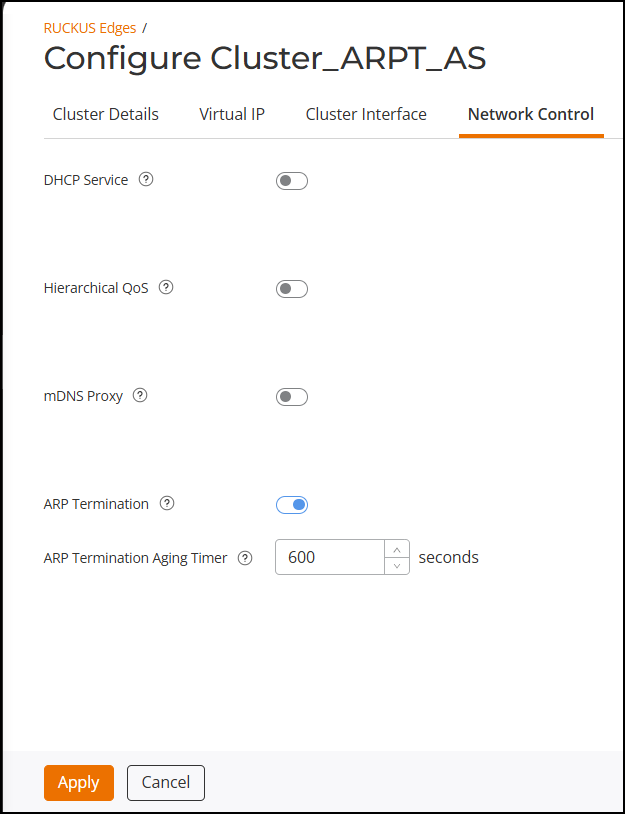
Configuring ARP Termination
- On the RUCKUS One navigation bar, select .
- Click the checkbox for the necessary RUCKUS Edge cluster from the list, then click Edit.
- Click the Network Control tab.
- The ARP Termination
feature is enabled by default. You can click the ARP Termination
toggle to disable this feature. Click the
 icon next to ARP
Termination to view the feature synopsis and the minimum
required firmware version. Click See the compatibility
requirements to view the minimum required firmware version and
the supported models.
- For the ARP Termination Aging
Timer, set the duration for which the system keeps the
association between an IP address and a MAC address in its cache. The default
value is set to 600 seconds. After the timer expires, the mapping is considered
outdated and is removed. This helps maintain accurate and up-to-date IP to MAC
mappings, ensuring smooth network operations.
Note: The ARP termination aging timer can be set to any value between 10 and 86,400 seconds. The expiration time for the cached IP to MAC mapping must be set to a value shorter than the DHCP lease time to ensure that mappings are refreshed and do not become stale.
If you set a higher aging timer value, cached entries may take longer to expire. This could result in stale or incorrect mappings until the entries are eventually aged out and removed.
Setting a very low aging timer value causes cached entries to expire quickly, leading to increased ARP broadcast traffic, which can potentially degrade network performance.
- Click Apply to save the network control settings.