Traffic Shaping
Feature Overview
The Traffic Shaping feature uses Hierarchical Quality of Service (HQoS) framework, which is an advanced network management technique that enhances traditional Quality of Service (QoS) by adding multiple levels of traffic scheduling as follows:
- Traffic Class Level:
This level represents services or applications, which are classified into
different classes to apply various QoS treatments. Software-Defined Local
Area Network (SD-LAN) may process the same traffic types as described
below.
- Voice: This class includes data that is sensitive to loss, latency, and jitter, such as voice and network controls, which are time-critical and loss-sensitive.
- Video: This class includes interactive video, such as video conferencing, as well as video streaming.
- Best Effort: This class combines best effort data client/server applications and interactive messaging applications. It also includes management packets, time-sensitive protocols, and proprietary controls (such as clustering).
- Background: This class is intended for applications that are relatively non-interactive and not dependent on firmware versioning, typically operating over a long period as background processes. Examples include FTP, email, backup operations, database synchronization or replication, and video content distribution.
-
Priority Level (Queue Level): This level represents different priorities within a traffic class. For instance, within the video class, video conferencing is considered higher priority than video streaming.
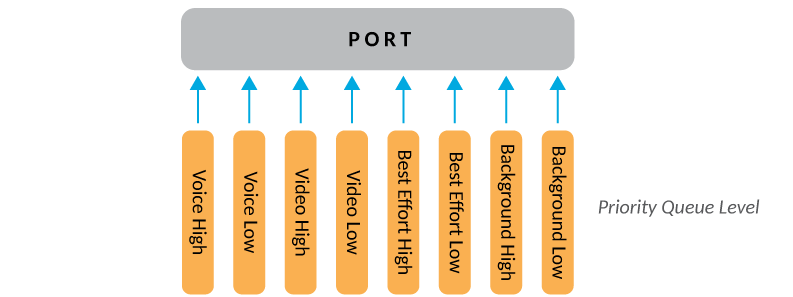
To ensure efficient and effective network performance, various types of network traffic are categorized into traffic classes and assigned priorities. Applications to Traffic Class and Priority Mapping details the mapping information.
Applications to Traffic Class and Priority Mapping
Requirements
Ensure that the firmware version is at least 2.3.0.1181 to support this feature.
Limitations
- The HQoS option can be enabled only on systems with at least 4 cores.
- HQoS is supported on virtual switches, but performance may be suboptimal.
- In a LAG environment, HQoS cannot independently manage the bandwidth of each physical port. The bandwidth control will be uniformly applied to all physical ports within the LAG.
- HQoS is supported only for SD-LAN and not for PIN
Considerations
Enabling or disabling the HQoS option restarts the data path component of the RUCKUS Edge device, resulting in a brief traffic disruption.
If a configuration failure occurs in RUCKUS One after HQoS state changes, you can resolve the issue by reapplying the bandwidth profile configuration in RUCKUS One.
Best Practices
Analyze your network traffic to identify potential bottlenecks or congestion points. This helps in understanding where traffic shaping can be most effective.
Begin with conservative bandwidth limits and adjust them as needed based on your observations. This ensures that you do not inadvertently disrupt critical services.
Regularly review and update your traffic shaping configuration to adapt to changing network conditions and application requirements.
Keep detailed records of any changes made to the traffic shaping configuration. This helps in troubleshooting and ensures consistency across the network.
Prerequisites
This feature has no prerequisites to feature enablement or usage.