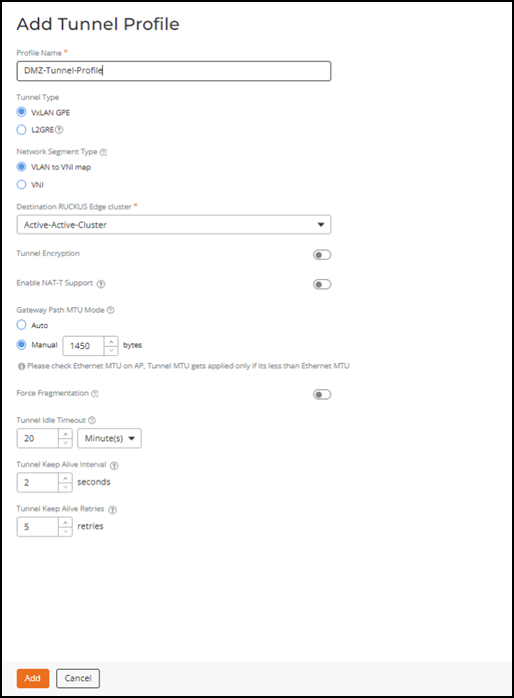
Adding a Tunnel Profile for DC-DMZ Edge VxLAN-GPE Tunnels
This tunnel profile defines the parameters for VxLAN-GPE tunnels between DC-DMZ Edge Clusters.
Complete the following steps to create a Tunnel Profile:
- On the RUCKUS One navigation
bar, select .The Service Catalog page is displayed.
- Click Add in the Tunnel Profile tile.
- Complete the following
fields:
- Profile Name: Enter the name for the tunnel profile.
- Tunnel Type: Select VxLAN GPE.
- Network Segmentation Type: Retain the VLAN to VNI map option that is selected by default.
- Destination RUCKUS Edge cluster: Select the DMZ cluster name.
- Tunnel Encryption: Do not enable tunnel encryption or NAT‑T support, as these features are not supported for VxLAN‑GPE tunnels between the data center and the DMZ Edge.
- Gateway Path MTU Mode: Select and configure Manual MTU only, as Auto PMTU discovery is not supported between DC and DMZ Edge clusters.
- Click Add. The Tunnel Profile is created and is displayed on the Tunnel Profile page.