Configuring mDNS Proxy Service in a Venue for RUCKUS Edge Clusters
An mDNS proxy service is a network proxy
that allows devices on different subnets to connect by forwarding requests between
network
interfaces. You can configure mDNS Proxy services for a RUCKUS Edge cluster in a specific
venue.
Note: The mDNS proxy service must already exist prior to performing this task. Refer to
Adding an mDNS Proxy Service for
detailed instructions.
- On the RUCKUS One navigation
bar, select Venues. The Venues page is displayed.
- Click on the venue name. The Venue Details page is displayed, defaulting to the Overview tab.
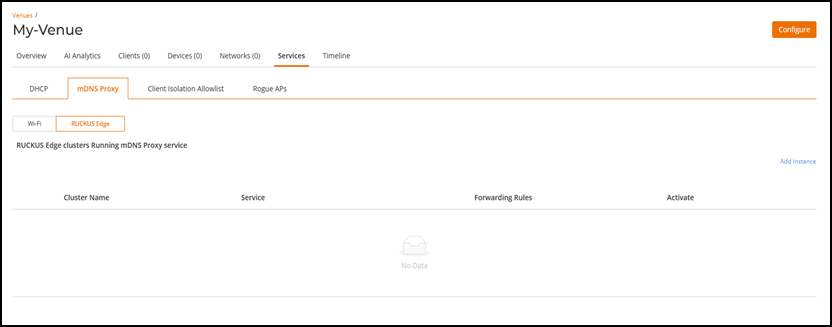
- Click the Services tab, click the mDNS Proxy sub-tab, then click RUCKUS Edge.
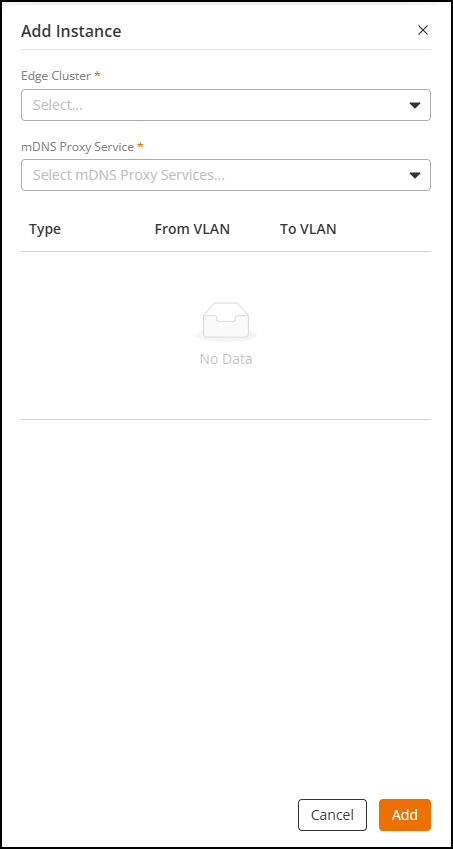
- Click Add Instance.
- Complete the following fields:
- Click Add.