Configuring an mDNS Proxy Service for a Cluster from a RUCKUS Edge Device
An mDNS proxy service is a network proxy that allows devices on different subnets
to
connect by forwarding requests between network interfaces. You can configure an mDNS
Proxy
service at the RUCKUS Edge cluster level.
- On the navigation bar, click
.The RUCKUS Edge page is displayed.
- Click the checkbox for the desired cluster, then click Edit.
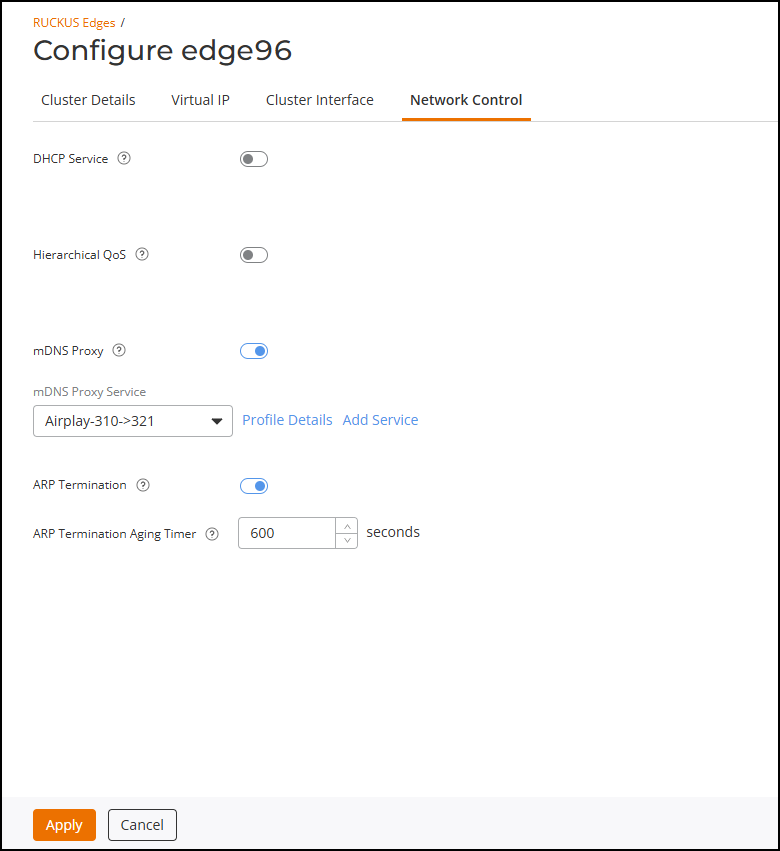
- Click the Network Control tab.
- Click the mDNS Proxy toggle to enable the option.
- Select the mDNS Proxy Service from the drop-down. Alternatively, click Add Service to create a new service; the Add mDNS Proxy page is displayed. If adding a new service, refer to Adding an mDNS Proxy Service for more information regarding service settings and scope.
- Click Apply to save and apply the configurations to the cluster.

 icon next to