Multicast DNS Gateway
Feature Overview
Bonjour is Apple's implementation of a zero-configuration networking protocol for Apple devices over IP. Bonjour allows OS X and iOS devices to locate other devices such as printers, file servers, and other clients on the same broadcast domain and use the services offered without any network configuration required. Multicast applications such as Bonjour require special consideration when being deployed over wireless networks. Bonjour only works within a single broadcast domain, which is usually a small area. This is by design to prevent flooding a large network with multicast traffic. However, in some situations, a user may want to offer Bonjour services from one VLAN to another.
RUCKUS Edge provides the Multicast DNS Gateway feature that helps devices to communicate and relay information across various network segments, enabling a client to discover and utilize services, for example, Apple TV.
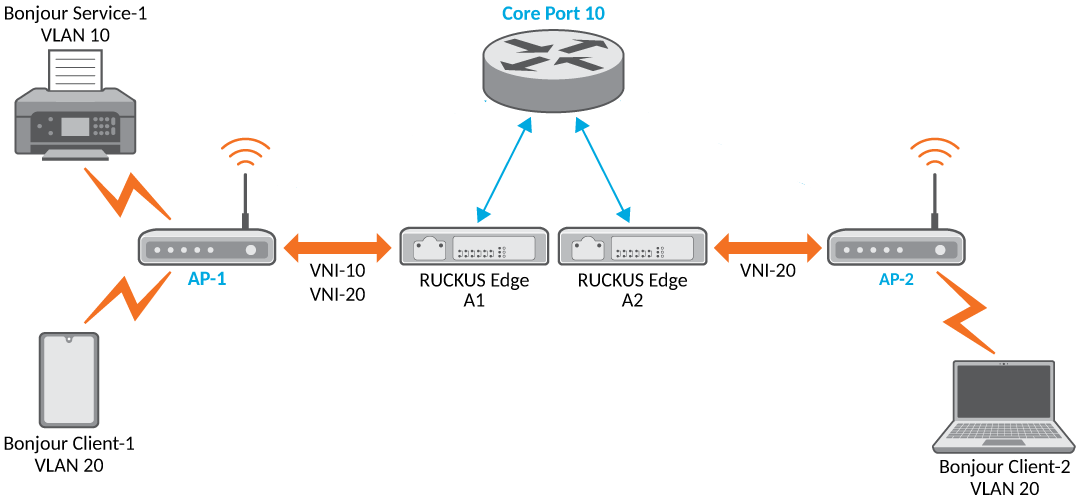
The steps involved when an mDNS gateway is configured on a RUCKUS Edge cluster, as shown in Multicast DNS Configuration in a Cluster, are as follows:
- Service Advertisement: Bonjour Service-1, VLAN 10, announces its presence on a specific network segment.
- Forwarding the Advertisement: A device (AP-1) forwards this announcement to another device (RUCKUS Edge A1) through a virtual network, VNI-10.
- Learning the Service Location: RUCKUS Edge A1 notes that the Bonjour service is available through AP-1 and forwards this information to another part of the network, core port.
- Discovering the Service: Another device (RUCKUS Edge A2) receives this information and learns that the Bonjour service is available on the core port.
- Client Request: A client device (Bonjour Client-2) sends a request to discover the Bonjour service to RUCKUS Edge A2 through a different virtual network, VNI-20.
- Forwarding the Request: RUCKUS Edge A2 checks its rules and determines that the request from the client, Bonjour Client-2 on VLAN 20, is forwarded to the service network, VLAN 10.
- Finding the Service: RUCKUS Edge A2 looks up where the service is located, core port, and forwards the request to core port.
- Routing the Request: RUCKUS Edge A1 receives the request on core port, checks its records, and forwards the request to AP-1.
- Response Path: The response from the service follows the same path back to the client, ensuring the client gets the information it needs.
Requirements
In SD-LAN deployments, RUCKUS Edge does not handle Layer 3 (L3) forwarding between VLANs. Therefore, it is essential to configure this feature on the core-router to enable communication between different subnets and VLANs. This ensures that end-to-end traffic flows correctly after mDNS-based service discovery and name resolution.
Ensure that the RUCKUS Edge firmware version is at least 2.3.0.1181 to support this feature.
Limitations
Note the following limitations regarding this feature:
- Unique Service Names: Each service name must be unique for each tenant (user or group). This means no two services can have the same name within the same tenant.
- Proxy Rules: A maximum of 32 rules can be configured for the mDNS Proxy.
- The mDNS proxy support is limited to SD-LAN services and does not extend to PIN service.
Considerations
Consider the following when configuring and using this feature:
- Avoiding loop: When configuring different forwarding rules in an active-active cluster, avoid using the same source VLAN and destination VLAN for the same service type. This can lead to an L2 forwarding loop between different nodes in the cluster.
- No Duplicate mDNS Rules: The mDNS rule list cannot have duplicate entries with the same Type and VLAN IDs.
- Service Deletion Restriction: You cannot delete an mDNS proxy service if the service is still active on any device in the cluster. This ensures that active services are not disrupted.
- VLAN ID Range: The VLAN ID (a number that identifies a specific network segment) can range between 1 through 4094, just like the APs mDNS rules.
- Forwarding mDNS Traffic: When an AP forwards the mDNS traffic to a RUCKUS Edge device, it keeps the original network segment (VLAN) information intact. This allows the RUCKUS Edge to recognize and discover services in the original VLAN.
- Clustering and Trunk Ports: In a cluster setup where multiple RUCKUS Edge devices work together, a trunk port is used to share service discovery information across all RUCKUS Edge devices in the cluster.
- Unicast Forwarding: For communication between different network segments (meaning, VLANs) and L3 subnets, proper L2 forwarding rules or routes need to be set up. In RUCKUS Edge deployments, these rules are usually configured on an external router, like a core router.
Best Practices
Here are some implementation best practices for the feature:- Understand mDNS Proxy: Ensure you have a clear understanding of how mDNS Proxy works and its benefits, such as allowing devices on different subnets to communicate with each other by forwarding mDNS requests.
- Plan Your Network: Before configuring, plan your network layout and identify which devices will need to communicate via mDNS. This will help you determine the necessary subnets and VLANs.
- Monitor and Optimize: After configuration, monitor the network to ensure that mDNS Proxy is working as expected. Make adjustments as needed to optimize performance.
- Documentation: Keep detailed documentation of your configurations and any changes made. This will be helpful for troubleshooting and future reference.
Prerequisites
In SD-LAN deployments, RUCKUS Edge does not handle Layer 3 (L3) forwarding between VLANs. Therefore, it is essential to configure this feature on the core-router to enable communication between different subnets and VLANs. This ensures that end-to-end traffic flows correctly after mDNS-based service discovery and name resolution.
You must ensure the following prerequisites are met so that service information is always up-to-date and accessible across the entire network:
- Pre-Creating Bridge Domains (BDs): To ensure all RUCKUS Edge devices in the cluster can receive service announcements, they need to create these BDs in advance, even if there are no clients or APs currently connected. For SD-LAN service, this is automatically handled for all mDNS-GW Service VLANs.
- Core Port Subinterface: By setting up the BDs with a core port subinterface, all RUCKUS Edge devices in the cluster can receive and share service advertisements efficiently. For SD-LAN service, this is automatically handled for all mDNS-GW Service VLANs. The core router connected to the core port must provide L2 switching capability on the subinterface VLANs, similar to the SD-LAN service.