Dual-WAN (Wide Area Network) configuration
enables a network to operate using two independent internet connections simultaneously.
This
setup is used to enhance connectivity resilience and ensures uninterrupted network
availability by automatically switching traffic between WAN links when a failure is
detected.
Feature Overview
A Dual-WAN setup strengthens network
resilience and streamlines traffic management by unifying multiple WAN connections
into a single, integrated system. This configuration ensures high availability and
maximized bandwidth efficiency. Dual-WAN Implementation
Example illustrates a Dual-WAN deployment with automatic failover
traffic redirection using a RUCKUS Edge device.
RUCKUS Edge Dual-WAN Implementation Overview
The RUCKUS Edge device connects to two
ISPs via WAN1 and WAN2, with WAN1 (ISP1) serving as the active link. Traffic from
APs is routed through WAN1 under normal conditions. A link monitor continuously
checks the health of the connection between ISP1 and its DNS server to ensure
connectivity. If the link fails, RUCKUS Edge automatically reroutes all traffic
through WAN2.
Dual-WAN Implementation
Example
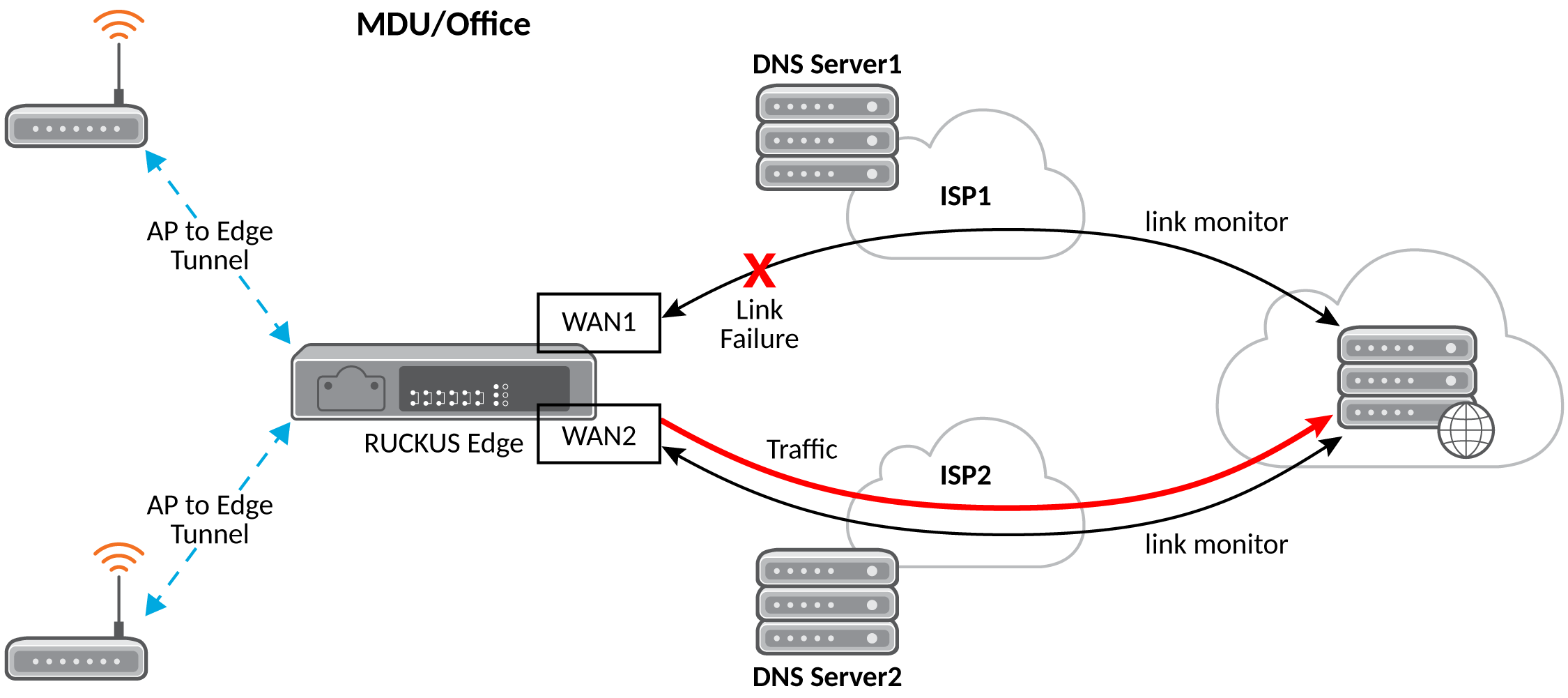
How Dual-WAN Failover Works
A detailed explanation of the key components and processes follows:
- Failure Detection
- If the link monitor detects a failure (for example, no response from
DNS Server1), the RUCKUS Edge identifies that WAN1 is down.
- This triggers the failover mechanism.
- Failover Activation
- The RUCKUS Edge automatically reroutes all traffic through WAN2,
which is connected to ISP2.
- Connection of ISP2 is also monitored via a link monitor to the DNS
Server (DNS Server2), ensuring it is stable.
- Failback Monitoring
- The RUCKUS Edge continues to monitor WAN1.
- Once WAN1 is restored and remains stable for a configured duration,
the system initiates failback.
- Traffic is then rerouted back to the primary WAN1 connection.
Requirements
This feature was introduced in RUCKUS
Edge release 2.4.0 and is applicable to all subsequent releases.
Limitations
This feature includes the following
limitations:
- Only single-node Edge
clusters are supported.
- Only physical WAN interfaces,
such as Ethernet or LAG, are supported.
- A maximum of two WAN links are supported: one active and one backup.
- Both WAN links must be configured to use the same IP mode, either STATIC or
DHCP IP Settings.
Considerations
This feature has no special
considerations pertaining to feature enablement or usage.
Best Practices
This feature has no special
recommendations for feature enablement or usage.
Prerequisites
This feature has no prerequisites to
feature enablement or usage.