Using FIPS CLI Commands (vSZ-D Console)
Provides CLI instructions to enable,
configure, and verify the FIPS mode on the system.
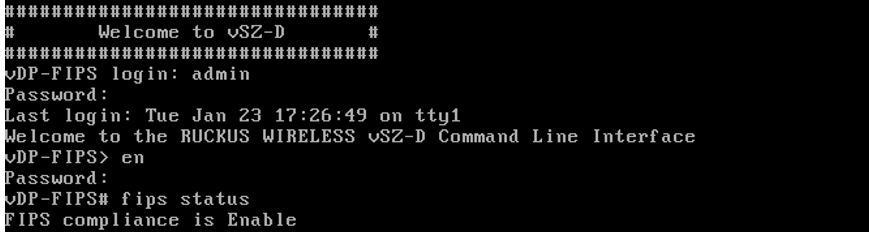
- After the virtual machine is deployed, click Power On to start the vSZ-D.
- At the
login prompt, log in using "admin" as both the
username and password. At the
>prompt, enter theenable(oren) command and provide the admin password to switch to Privileged EXEC mode. - Enter the command
fips statusto verify if the FIPS mode is enabled. - Enter
fips ?at the command prompt to display a list of available FIPS commands as shown. - Enter
fips selftestto run an on-demand self-test and save the results to the log. - Enter
fips showlogto display the results of an on-demand test of FIPS crypto modules.Sample output of the FIPS showlog commandnode1# fips showlog All services are running in approved mode. Running OpenSSL FIPS validation tests On Demand Type: KAT_Digest , Desc: SHA1 , Result: Pass Type: KAT_Digest , Desc: SHA2 , Result: Pass Type: KAT_Digest , Desc: SHA3 , Result: Pass Type: KAT_Cipher , Desc: AES_GCM , Result: Pass Type: KAT_Cipher , Desc: AES_ECB_Decrypt , Result: Pass Type: KAT_Signature , Desc: RSA , Result: Pass Type: KAT_Signature , Desc: ECDSA , Result: Pass Type: KAT_KDF , Desc: TLS13_KDF_EXTRACT , Result: Pass Type: KAT_KDF , Desc: TLS13_KDF_EXPAND , Result: Pass Type: KAT_KDF , Desc: TLS12_PRF , Result: Pass Type: KAT_KDF , Desc: PBKDF2 , Result: Pass Type: KAT_KDF , Desc: SSHKDF , Result: Pass Type: KAT_KDF , Desc: KBKDF , Result: Pass Type: KAT_KDF , Desc: HKDF , Result: Pass Type: KAT_KDF , Desc: SSKDF , Result: Pass Type: KAT_KDF , Desc: X963KDF , Result: Pass Type: KAT_KDF , Desc: X942KDF , Result: Pass Type: KAT_KDF , Desc: IKEV2_KDF_SKEYSEED , Result: Pass Type: KAT_KDF , Desc: IKEV2_KDF_DKM , Result: Pass Type: KAT_KDF , Desc: IKEV2_KDF_DKM_SA , Result: Pass Type: KAT_KDF , Desc: IKEV2_KDF_DKM_SA_DH , Result: Pass Type: KAT_KDF , Desc: IKEV2_KDF_REKEY , Result: Pass Type: KAT_KDF , Desc: SNMPv3_KDF , Result: Pass Type: DRBG , Desc: HASH , Result: Pass Type: DRBG , Desc: CTR , Result: Pass Type: DRBG , Desc: HMAC , Result: Pass Type: KAT_KA , Desc: DH_2048 , Result: Pass Type: KAT_KA , Desc: DH_3072 , Result: Pass Type: KAT_KA , Desc: DH_4096 , Result: Pass Type: KAT_KA , Desc: ECDH_P256 , Result: Pass Type: KAT_KA , Desc: ECDH_P384 , Result: Pass Type: KAT_KA , Desc: ECDH_P521 , Result: Pass Type: KAT_AsymmetricCipher , Desc: RSA_Encrypt , Result: Pass Type: KAT_AsymmetricCipher , Desc: RSA_Decrypt , Result: Pass Type: KAT_AsymmetricCipher , Desc: RSA_Decrypt , Result: Pass Type: KAT_Integrity , Desc: HMAC , Result: Pass Type: Module_Integrity , Desc: HMAC , Result: Pass
- Enter
fips zeroizationto delete or overwrite all system configuration, network configuration, private and public keys, certificates, passwords, passphrases, and data. Enter Y to confirm the command or N to cancel the command. After the configuration and data are deleted, the zeroization process resets the vSZ to factory settings.