Uploading Certificates to SmartZone Controller

For Active Directory (AD), Lightweight Directory Access Protocol (LDAP), external syslog over IPsec, and RADIUS over TLS, import the root CA certificate into the local machine to validate the server certificate against a trusted certificate authority.

To upload certificates after validation, perform the following -

  1. From the main menu, navigate to Administration > System > Certificates> SZ Trusted CA Certificates/Chain (external).
    This displays the SZ Trusted CA Certificates/Chain (external) screen.
  2. Click the Import option.

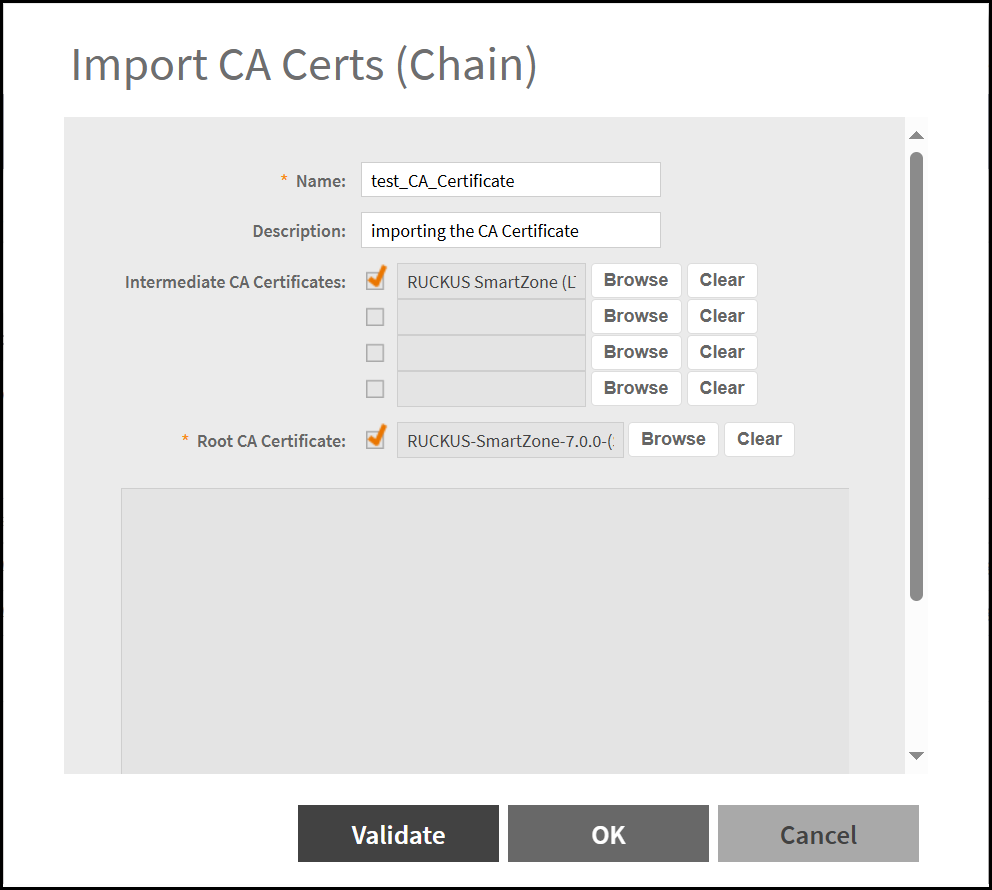
    Import CA Certificate

  3. Enter the following options -
    • Name - Enter an appropriate name in the name field.
    • Description - Enter a short description for the CA Certificate.
    • Intermediate CA Certificates - Upload the intermediate CA certificates by clicking the Browse button.
    • Root CA Certificate - Upload the root CA certificate by clicking the Browse button.
  4. Click Validate after uploading the certificates.
    Note: Only CER and PEM formats are supported for the CA certificates.