External Syslog Server
Specifies a remote server used by the
controller to forward system logs, event alerts, and audit records for centralized
logging,
monitoring, and long-term retention.
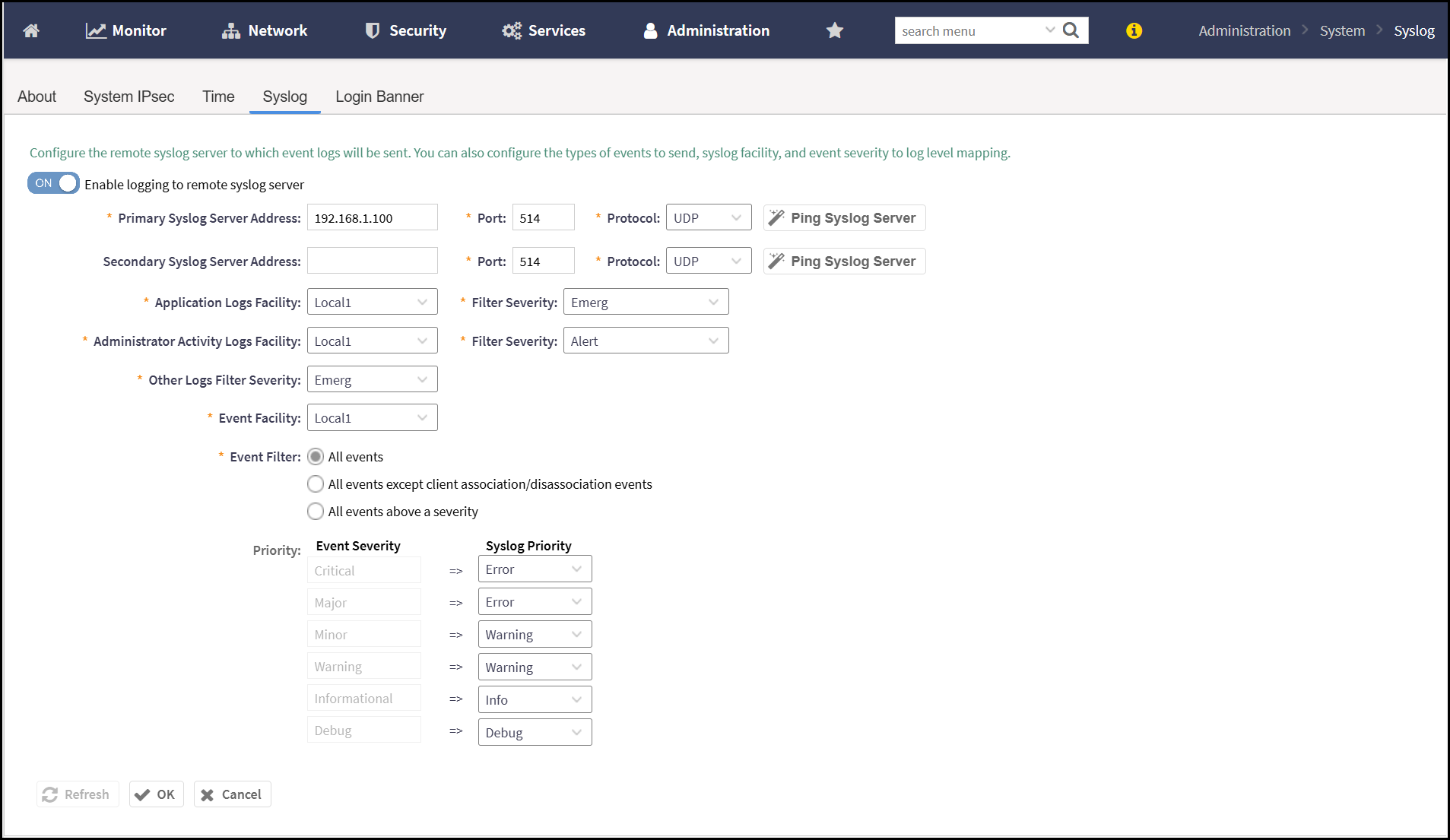
To configure external syslog server, perform the following -
- From the main menu, navigate to .This displays the Syslog screen.
- In the Syslog screen, the Enable logging to
remote syslog serveroption is disabled, by default. Activate
this option by enabling the toggle button and configure the following -
- Primary Syslog Server Address - Enter the IP address or Fully Qualified Domain Name (FQDN) of the primary external Syslog server where system logs, event alerts, and audit messages are sent.
- Secondary Systlog Server Address - Specifies the IP address or Fully Qualified Domain Name (FQDN) of the secondary Syslog server used for redundancy. If the primary server becomes unreachable, logs are forwarded to this secondary server.
- Redundancy Mode - Controls failover behavior to maintain service availability during failures. Select a redundancy mode from the available options.
- Application Logs Facility - Specifies the Syslog facility code assigned to application-level log messages.
- Administrator Activity Logs Facility - Select the Syslog facility code from the drop-down list used to categorize logs related to administrator actions, such as logins, configuration changes, or policy updates.
- Other Logs Filter Severity - Select the Syslog facility and minimum severity level from the drop-down list for all remaining log types that do not fall under application or administrator activity categories.
- Event Facility - Select the Syslog facility code from the drop-down list used for forwarding system-generated events such as alarms, status changes, and notifications.
- Event Filter - Select the scope of events to be forwarded to the external Syslog server.
- Priority - Defines the event importance represented in Syslog messages sent to external server.
Note: Apart from the event logs, the controller also stores the audit logs on the local server, and sends them to the syslog servers. For AP and vSZ-D, the audit logs are not stored on the local server, they are buffered and sent to the controller in real-time. This buffer occurs in RAM. In the event buffer is full all new audits are discarded although there is an age out mechanism to prevent this from happening. Any audits in the buffer that cannot be sent to the controller within 30 minutes are deleted from the buffer. After the audits are sent the controller forwards them to the configured syslog server. The controller performs log rotation on both the file system and database. It stores system log files of the file system and the database. The permitted log files size is 100 MB and 14 archives of such application logs are allowed.Note: The external syslog port number must be 514. If an external syslog server is configured, all audit data and events are simultaneously sent to the external syslog server. The controller uses log rotation to overwrite the oldest audit records and prevent local storage space from becoming full.