Configuring System Time
Configures the system time settings,
including time zone, NTP servers, and manual time options, to ensure accurate time
synchronization across the network.
The controller synchronizes time across cluster nodes and managed access points using an external Network Time Protocol (NTP) server. The NTP server, accessible through the IPSec tunnel or directly via its IP address, securely synchronizes time with the controller.
Note: The controller supports version 4.2.6p54.2.8p18@1.4062-o of NTP. The SZ
controllers and AP does not accept broadcast and multicast NTP packets that
would result in the timestamp, these packets are ignored by default.
To configure system time, perform the following -
- From the main menu, navigate to
.This displays the Time screen.
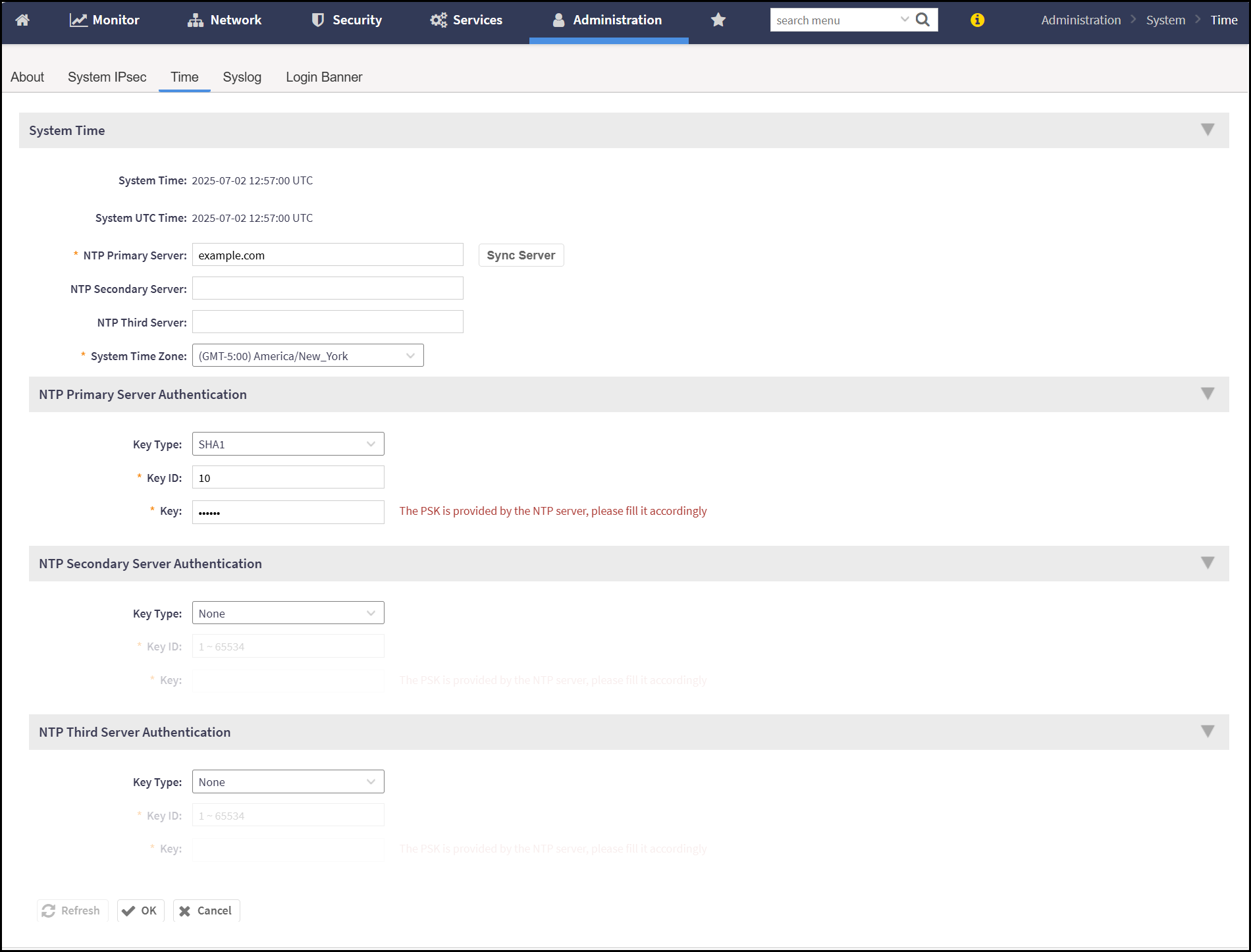
- In the Time screen, enter the following -
- System Time
- System Time - Displays the current time settings of the controller, including time zone and synchronization method.
- System UTC Time - Displays the current system time in Coordinated Universal Time (UTC).
- NTP Primary Server - Specifies the IP address or Fully Qualified Domain Name (FQDN) of the primary Network Time Protocol (NTP) server used to synchronize the controller’s system time. This is a mandatory field.
- NTP Secondary Server - Specifies the IP address or Fully Qualified Domain Name (FQDN) of a secondary NTP server. Used for time synchronization if the primary NTP server becomes unreachable. This is an optional field.
- NTP Third Server - Specifies the IP address or Fully Qualified Domain Name (FQDN) of a tertiary NTP server. Acts as an additional fallback if both the primary and secondary NTP servers are unavailable.
- System Time Zone - Specifies the time zone setting for the controller. For example, America/New_York (UTC-05:00) - Eastern Time (ET).
- NTP Primary Server Authentication - Configures
authentication settings for the primary NTP server to ensure secure and
verified time synchronization.
- Key Type - By default, the drop-down list displays None. Select the authentication key type from the drop-down list to enable the Key ID and Keyfields.
- Key ID - Enter the numeric identifier associated with the authentication key.
- Key - Enter the shared secret used for authenticating time updates from the server.
- System Time
- After entering all the details, click OK.
If the SZ leader node is FIPS-enabled, it periodically checks the time difference with the external NTP server every 5 minutes. Based on the calculated time difference (TD = TNTP − TSZ) the SmartZone takes different actions as outlined in the table below.
Table Showing the Time Difference and the Associated Action