Configuring System IPSec Profile using Preshared Key and Certificate
Pre-shared key–based authentication
provides a simple method for establishing trust between IPSec peers and is suitable
for
environments with a limited number of tunnels.
- From the main menu, navigate to
.This displays the System IPSec screen.Note: The add mode is not user-configurable. The system operates in Tunnel mode by default for communication with the external syslog server.
- In the System
IPSec screen, enter the following -
- Enable
IPSec - By default, this option is disabled, activate
the Enable
IPSec toggle and configure the following settings -
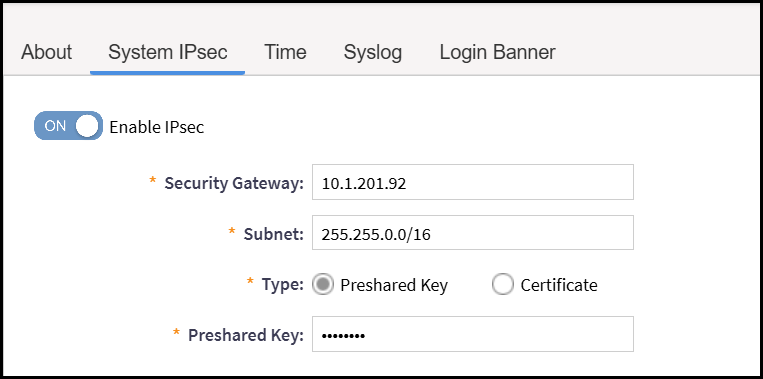
- Security Gateway - Specifies the IP address of the external peer device (such as a syslog server or VPN gateway) that establishes the IPSec tunnel with the SmartZone controller.
- Subnet - Specifies the destination subnet.
- Type - Select the
authentication method used for establishing the IPSec tunnel.
- Preshared
Key - Uses a shared secret key for mutual authentication
between SmartZone and the peer device. If Preshared Key
is selected then enter the preshared key details.
Attention: The preshared key text ranges from 15 through 64 ASCII characters or 44 through 128 bit-based characters and any combination of upper and lower case letters, numbers, and special characters (that include: '!', '@', '#', '$', '%', '^', '&', '*', '(', and ')' , except " or ' or $( characters. For example, Pa$$w0rd4F!rst%!P$*c#.
- Preshared
Key - Uses a shared secret key for mutual authentication
between SmartZone and the peer device. If Preshared Key
is selected then enter the preshared key details.
- Enable
IPSec - By default, this option is disabled, activate
the Enable
IPSec toggle and configure the following settings -
Configuring IPSec Using Certificate
Certificate-based authentication enhances security by enabling scalable,
centralized trust management and stronger identity verification between IPSec
peers.
- From the main menu, navigate to .This displays the System IPSec screen.
- In the System IPSec screen, enter the following
-
- Enable IPSec - By default, this option is
disabled, activate the Enable IPSec toggle
and configure the following settings -
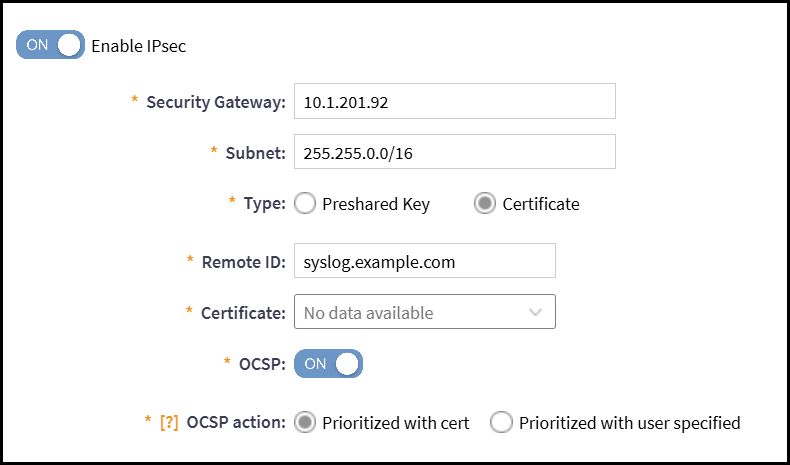
- Security Gateway - Specifies the IP address of the external peer device (such as a syslog server or VPN gateway) that establishes the IPSec tunnel with the SmartZone controller.
- Subnet - Specifies the destination subnet.
- Type - Select the authentication method as
Certificate to establishithe
IPSec tunnel and enter the following -
- Remote ID - Enter the Remote ID (syslog.example.com).
- Certificate - Click the drop-down arrow to select the SZ Certificate. Certificate can be uploaded from .
- OCSP - By default disabled, enable only if , OCSP action with Prioritized with cert or Prioritized with user specified.
- Enable IPSec - By default, this option is
disabled, activate the Enable IPSec toggle
and configure the following settings -
Certificate Validation Failure
Indicates a failure in establishing a trusted connection due to certificate
validation issues, such as invalid, expired, or untrusted certificates.
- Consult the system audit logs to identify the specific reason for the certificate validation failure (for example, expiration, untrusted issuer, revocation, or Subject Alternative Name mismatch).
- Verify that the local system clock is accurately synchronized with a trusted time source to eliminate time-related validation errors.
- If the failure indicates an untrusted issuer, verify the configured trust anchors. Securely import any missing Root or Intermediate CA certificates into the device’s trust store, if required.
- If the failure is due to revocation, expiration, or identity mismatch, coordinate with the remote peer’s owner to obtain a newly issued, valid certificate that meets the configured security requirements.
- Attempt to re-establish the trusted channel after resolving the identified issue.
Configuring IKE, ESP and Tunnel State
After selecting Preshared Key or Certificate to configure the IPSec.
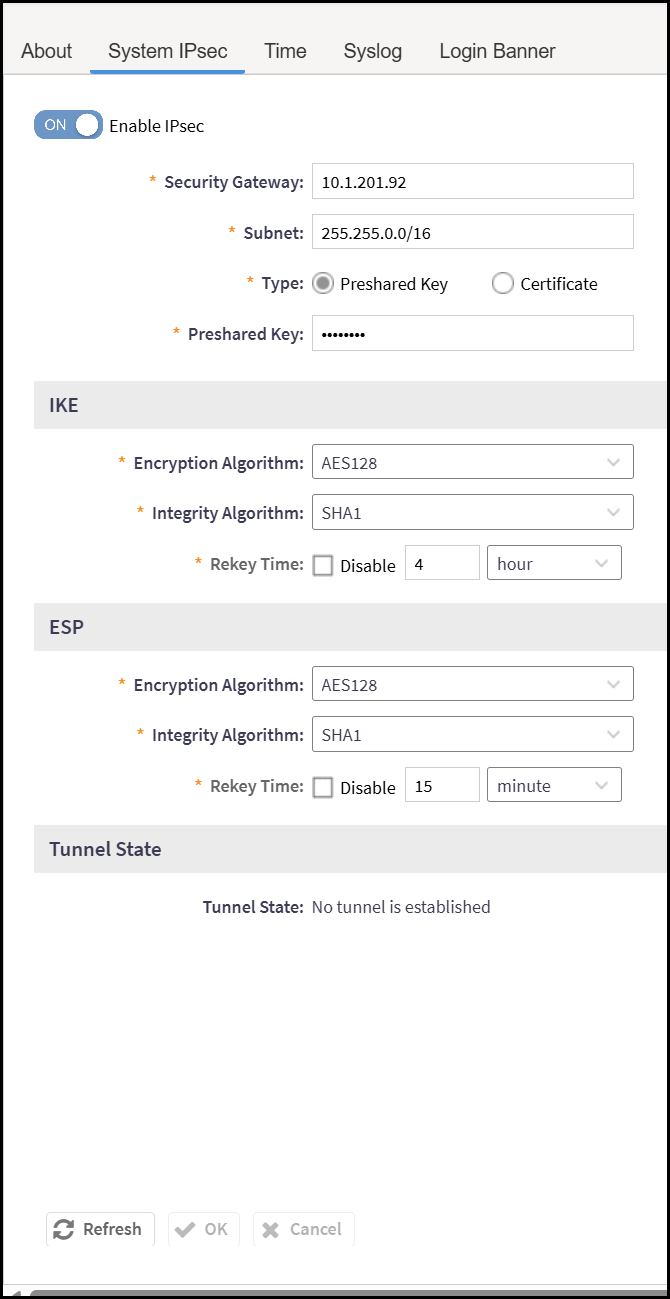
IKE - Internet Key Exchange (IKE) is a protocol used to set up a secure, authenticated communication channel between two devices over an IPSec VPN tunnel.
- Encryption Algorithm -
Select the algorithm from the drop-down list used to encrypt data in the
IPSec tunnel, ensuring confidentiality during transmission.
- AES128 - Advanced Encryption Standard (AES) with 128-bit keys is a symmetric encryption algorithm that provides strong data protection by encrypting and decrypting information using a fixed 128-bit key.
- AES192 - Advanced Encryption Standard with 192-bit keys is a symmetric encryption algorithm that secures data by using a 192-bit key for encryption and decryption.
- AES256 - Advanced Encryption Standard with 256-bit keys) is a symmetric encryption algorithm that provides a very high level of security by using a 256-bit key for encrypting and decrypting data.
- AES256GCM with 128bit ICV - Is an encryption algorithm that combines AES-256 (Advanced Encryption Standard with a 256-bit key) and GCM (Galois/Counter Mode) for authenticated encryption. It ensures both data confidentiality and integrity, using a 128-bit Integrity Check Value (ICV) to verify that the data has not been tampered with during transmission.
- Intergrity Algorithm -
Select the algorithm from the drop-down list used to ensure data
integrity and authenticity for IPSec tunnel packets.
- SHA1 - Generates a 160-bit hash value.
- SHA256 - Produces a 256-bit hash value. Widely used and considered secure.
- SHA384 - Produces a 384-bit hash value. Provides stronger security than SHA-256 and is commonly used in high-security environments.
- SHA512 - Produces a 512-bit hash value. Offers a high security margin and is suitable for environments requiring strong cryptographic protection.
- Rekey Time - Enter the time interval (in day, hours or minutes) after which the IPSec tunnel’s encryption keys are renegotiated. While a Disable option is available it must remain enabled to maintain the required security configuration.
- Encryption Algorithm -
Select the algorithm from the drop-down list used to encrypt data in the
IPSec tunnel, ensuring confidentiality during transmission.
Note: To maintain the overall security of the IPSec tunnel, the IKE encryption key length must be equal to or greater than the ESP encryption key length.
- Intergrity Algorithm -
Select the algorithm from the drop-down list used to ensure data
integrity and authenticity for IPSec tunnel packets.
- SHA1 - Generates a 160-bit hash value.
- SHA256 - Produces a 256-bit hash value. Widely used and considered secure.
- SHA384 - Produces a 384-bit hash value. Provides stronger security than SHA-256 and is commonly used in high-security environments.
- SHA512 - Produces a 512-bit hash value. Offers a high security margin and is suitable for environments requiring strong cryptographic protection.
- Rekey Time - Enter the
time interval (in day, hours and minutes) after which the IPSec tunnel’s
encryption keys are renegotiated. While a Disable
option is available it must remain enabled to maintain the required
security configuration.
The system supports Diffie-Hellman (DH) group ECP384 for key exchange operations.
Tunnel State - Is the current operational tunnel status of a tunnel.
Note: If the peer
certificate authority information has OCSP server information, and user has
manually configured the OCSP server, then the status of the certificate can
be summarized as follows:
Checking Server Certificate Status
| Prioritized with user specified | Prioritized with cert | Final Result of Server Certifiate Validation |
|---|---|---|
| PASS | PASS | PASS |
| OCSP server unreachable | PASS | PASS |
| PASS | OCSP server unreachable | PASS |
| OCSP server unreachable | OCSP server unreachable | FAIL |
| FAIL | PASS | FAIL |
| PASS | FAIL | PASS |
| FAIL | FAIL | FAIL |
Note: The authentication digest algorithm is not
configurable. The system uses SHA-1 for IPsec
authentication.