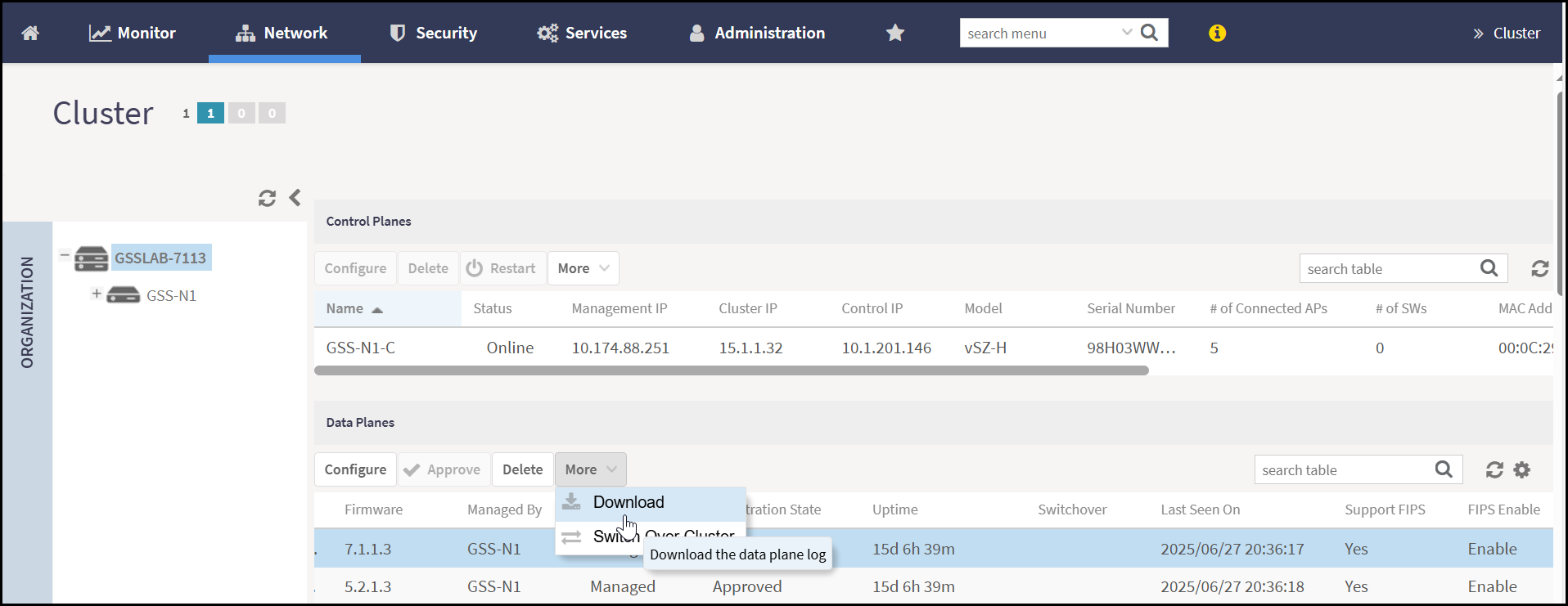
Downloading vSZ-D FIPS Logs
Allows administrators to export system and security-related logs from a vSZ-D
instance operating in FIPS mode. These logs support auditing, troubleshooting, and
compliance verification.
vSZ-D FIPS logs can be downloaded to the local machine. Only the administrators can view and download the FIPS logs.
To download the vSZ-D FIPS logs, perform the following -
- From the main menu, navigate to .This displays the Cluster screen.
- In the Cluster screen, navigate to the Data Planes section. Select the Data Plane from the list and click More.
- Click
Download in the More action
menu.This displays the confirmation dialog box, click Yes to download the selected Data Plane support log.Note: Only a vSZ-D instance licensed with a FIPS Stock Keeping Unit (SKU) can join a vSZ controller that is also configured with a FIPS SKU. After a successful join, FIPS mode is automatically replicated to the vSZ-D. However, if the controller undergoes zeroization, the effect is not replicated to the vSZ-D. This is because vSZ-D is an independent node and loses its connection to the controller during zeroization.