Different Rule types and Classification
Rogue classification policy has two main configurations for Detection and Reporting -
Rule type defines the type of rule to match the classification policy. The supported list is described in the below sections -
Active Probing
The Monitoring AP detects active scanning (transmission of Probe Request Frames) by the EUDs and reports to the SmartZone.

Ad Hoc
Detect and report authorized clients establishing peer-to-peer connection with any other allowed/non-allowed client.
The following connection types are supported -

AllowListed AP
Detect and report allowlisted AP. Allowlisted AP are those configured in the Allowed Device Profile associated with the Monitoring AP Zone.

AllowListed Client
Detect and report allowlisted Client. Allowlisted Client are those configured in the Allowed Device Profile associated with the Monitoring AP Zone.

Auth Flood
Detect and report if the number of authentication frames per second exceeds the specific threshold from a specific transmitter. The default number of frames per second is 50.

Client MAC Spoofing
Detect and report the spoofing of MAC address of an allowListed client. The detection is possible when the client is connected to an allowlisted AP, and when the spoofing device is in a geographically distant area.

Connected Unauthorized SSID
Detect and report authorized AP broadcasting a unauthorized SSID utilizing 2.4 GHz and 5GHz bands.

CTS Abuse
Detect and report if the number of CTS frames per second to a specific receiver MAC address exceeds the specific threshold. The default number of frames per second is 50.

Deauth Flood
Detect and report if the number of deauthentication frames per second exceeds the specific threshold from a specific transmitter. The default number of frames per second is 50.

Disassoc Flood
Detect and report if the number of disassociation frames per second exceeds the specific threshold from specific transmitter. The default number of frames per second is 50.

EAP Flood
Detect and report if the number of disassociation frames per second exceeds the specific threshold from specific transmitter. The default number of frames per second is 50.

Excessive Power
Detect and report if the traffic with excessive transmit power level exceeds the maximum.

Failed Attempts WLAN
Detect and report high number of failed attempts to join the WLAN in a short period of time.
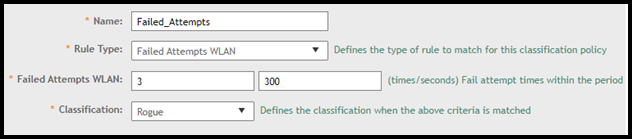
Failed attempts range is 3-20 times within 300-900 secs.
ICS Connection
Detect and report the establishment of the ICS connection (Internet Connection Sharing).

Long SSID

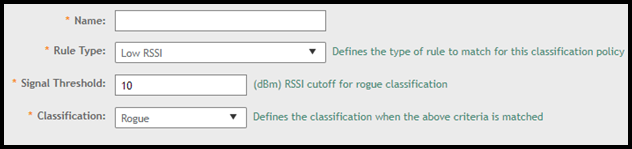
Low RSSI
Detect and report Low RSSI when configured Signal Threshold is crossed.
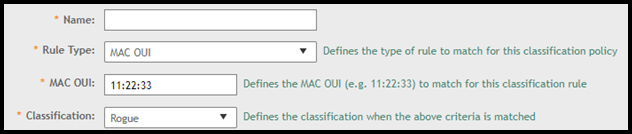
MAC OUI
Detect and report if the configured MAC is matched. In the MAC OUI field, enter the first three octets of the MAC address. For example, for a MAC address 11:22:33:44:55:66, the MAC OUI is 11:22:33.
MAC Spoofing
Detect and report the spoofing of the MAC address of an allowListed AP. It is also known as AP MAC (BSSID) spoofing .

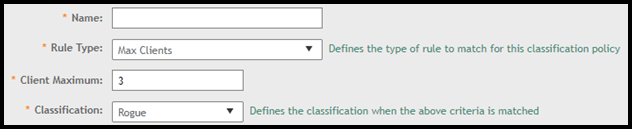
Max Clients
Detect and report when the number of client connected to particular allowListed AP exceed the configured threshold (1-1024).
Mesh Network
Detect and report the establishment of point-to-point wireless bridge with an allowListed APs.

Non-Allowlisted AP
Detect and report the deployed non-allowListed AP that are not part of the configured Allowed Device profile.

Non-Allowlisted Client
Detect and report the Deployed non-allowListed client that are not part of the configured Allowed Device profile and connected to AP.

Null SSID
Configure the AP to have null SSID. In WLAN config Advanced option turn 'ON' the ‘Hide SSID’. Attempt to connect an allowListed EUD to the AP without supplying the correct AP SSID. Mon AP should detect & report this.

Packet Flood
Detect and report the Generation a large amount of TCP/UDP traffic from a given client(s).

RTS Abuse
Reported when the number of RTS frames per second to a specific receiver MAC address exceeds the specific threshold. The default number of frames per second is 50. Range is 1 to 50.

Same Network
Detect and report the AP that is part of the same network SZ.

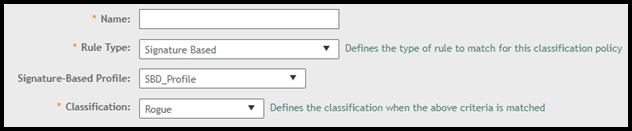
Signature Based
Detect and report when a client sends WIFI packets, matching the configured signature/pattern, to an authorized AP.
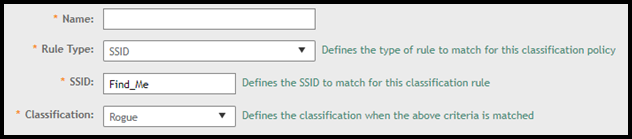
SSID
Detect and report the partially or completely configured SSID string regardless of the zone being configured with the specific SSID.
SSID Spoofing
Detect and report the SSID that is configured in a specific zone from a non-managed AP.

Unauthorized Ap Broadcast Authorized SSID
Detect and report a non-allowListed service AP broadcasting a SSID (part of the same controller).

Unauthorized Auth Scheme
Auth scheme that is not part/configured of the AP are considered as unauthorized auth scheme. Authorized Auth scheme is 802.1x EAP and all other Auth scheme are considered as unauthorized.
Detect and report when an allowlisted AP utilizing unauthorized authorization scheme.

Unauthorized Encryption Scheme
AES encryption type is the only allowed encryption scheme. TKIP and none are considered as unauthorized.
Detect and report when an AP or EUD uses unauthorized authentication scheme.

Unauthorized SSID
Detect and report the allowListed AP broadcasting an unauthorized SSID.
SSID is considered authorized only if configured to be used by a managed WLAN.

Unencrypted Traffic
Detect and report unencrypted data frames being sent between AP (both allowlisted and nonallowlisted) and EUD (both allowlisted and nonallowlisted).

Weak/Outdated Protocol
Detect and Report weak/outdated WLAN protocol to generate an alert when allowlisted AP uses/utilizes the 802.11g or older WLAN protocol.

Weak/Unsupported/Disallowed Encryption Scheme
Detect and Report an allowed AP advertising a SSID configured/changed with weak/unsupported/disallowed encryption options.

Windows Hosted Network
Detect and report a windows hosted network established with an allowlisted client.
