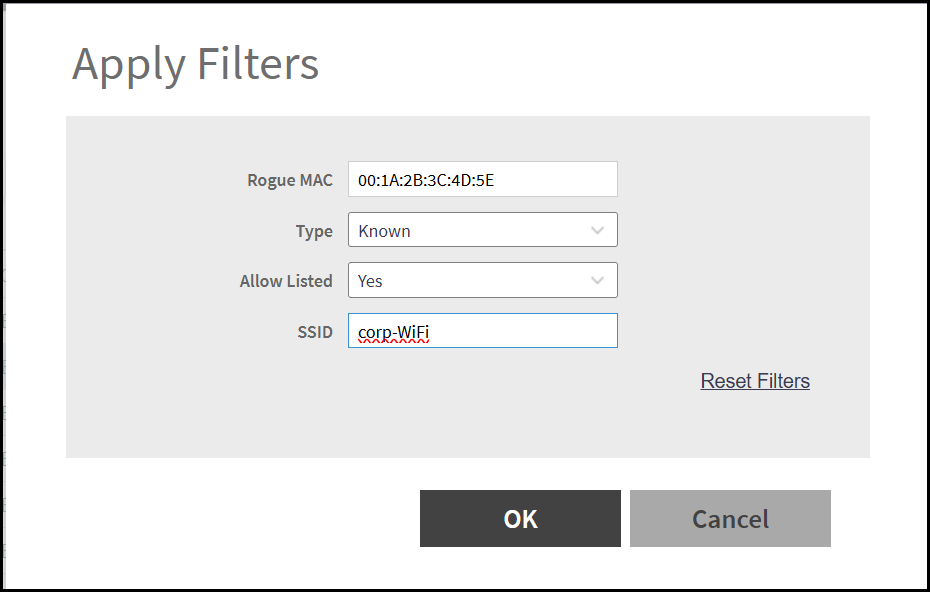
Filtering Rogue Devices
Filters detected wireless devices based on
classification, signal strength, SSID, MAC address, or other attributes to help
identify
potential threats and reduce noise in the monitoring view.
To filter rogue devices, perform the following-
- From the main menu, navigate to
Select .
This displays the Rogue Devices screen.
- In the Rogue
Devices screen, select Access
Point/Client from the list and click Settings (
 ).
This displays Apply
Filters window.
- In the Apply Filters window, enter any of the following details -
- Rogue MAC - Enter the rogue MAC address. This helps to track and analyze unauthorized devices in the network.
- Type - Select the classification category from the drop-down list.
- Allow Listed - Indicates whether the detected device is present in the Allowed List. Select the allow listed type as Yes or Nofrom the drop-down list.
- SSID:
Enter the Service Set Identifier (SSID). For example,
corp-WiFi.
- Click OK.