Setting the Dedicated Master IP Address in
the Member AP CLI
Note: Before you begin, ensure that Dedicated Master setup has been completed.
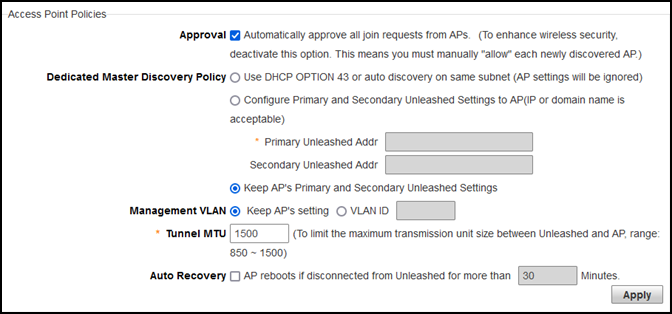
Go to Admin & Services > System > System Info > Access Point Policies.
Select the Approval check
box.
For Dedicated Master Discovery
Policy, select Keep AP's Primary and
Secondary Unleashed Settings.
Maintaining the
Unleashed Settings of the AP
Power on the AP and set the
Dedicated Master IP address in the member AP CLI.
ruckus>
ruckus> en
ruckus#
ruckus# ap-mode
You have all rights in this mode.
ruckus(ap-mode)#
ruckus(ap-mode)# set director ip 2.2.2.2
** Please reboot for this change to take effect
OK
ruckus(ap-mode)#
After
reboot, the member AP automatically joins Dedicated Master.