Gateway Mode
Gateway mode provides a solution for small and midsize business (SMB) customers who want to provide private IP addresses for clients and do not have an existing gateway router, or who connect to their Internet service provider (ISP) over PPPoE. Enabling Gateway mode provides Network Address Translation (NAT) and DHCP functionality to assign private IP addresses to member APs and clients.
Only the H350 AP and the H550 AP support dual WAN ports, where one Ethernet port is configured as the active WAN port and the other Ethernet port is configured as the standby WAN port for the RUCKUS Unleashed gateway. At any given point, only one Ethernet port acts as the active WAN port. The traffic moves through the active WAN port. If the active WAN port fails, the traffic is automatically switched to the standby WAN port until the active WAN port recovers.
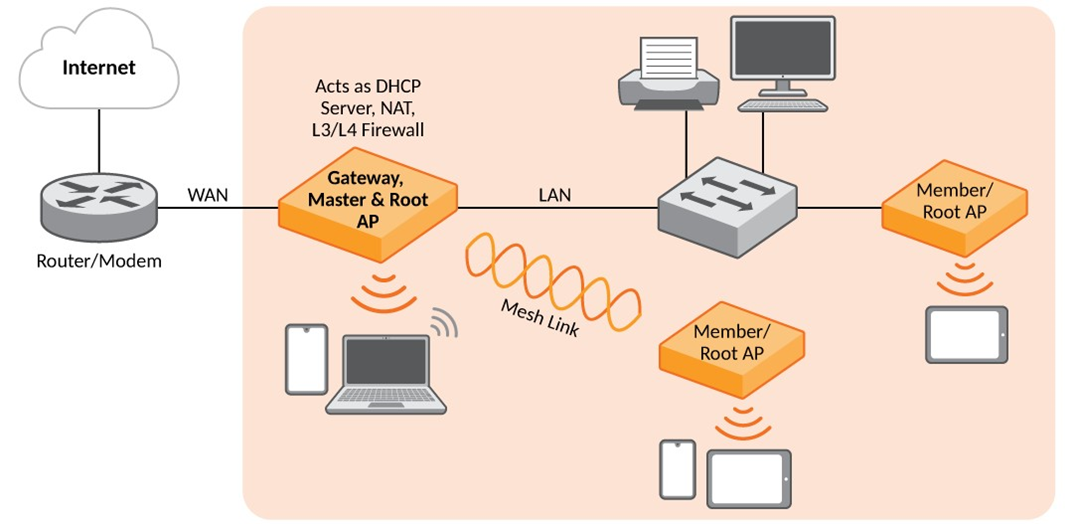
Gateway functionality can be restored with minimum user intervention when a Gateway Master AP is out of service. If the Gateway Master AP goes down, simply replace it with one of the member APs and connect the uplink Ethernet cable to the WAN port, and the member AP will become the new gateway.
If the gateway recovery mechanism does not work, you can still access the web interface of the new Master AP to configure it manually.