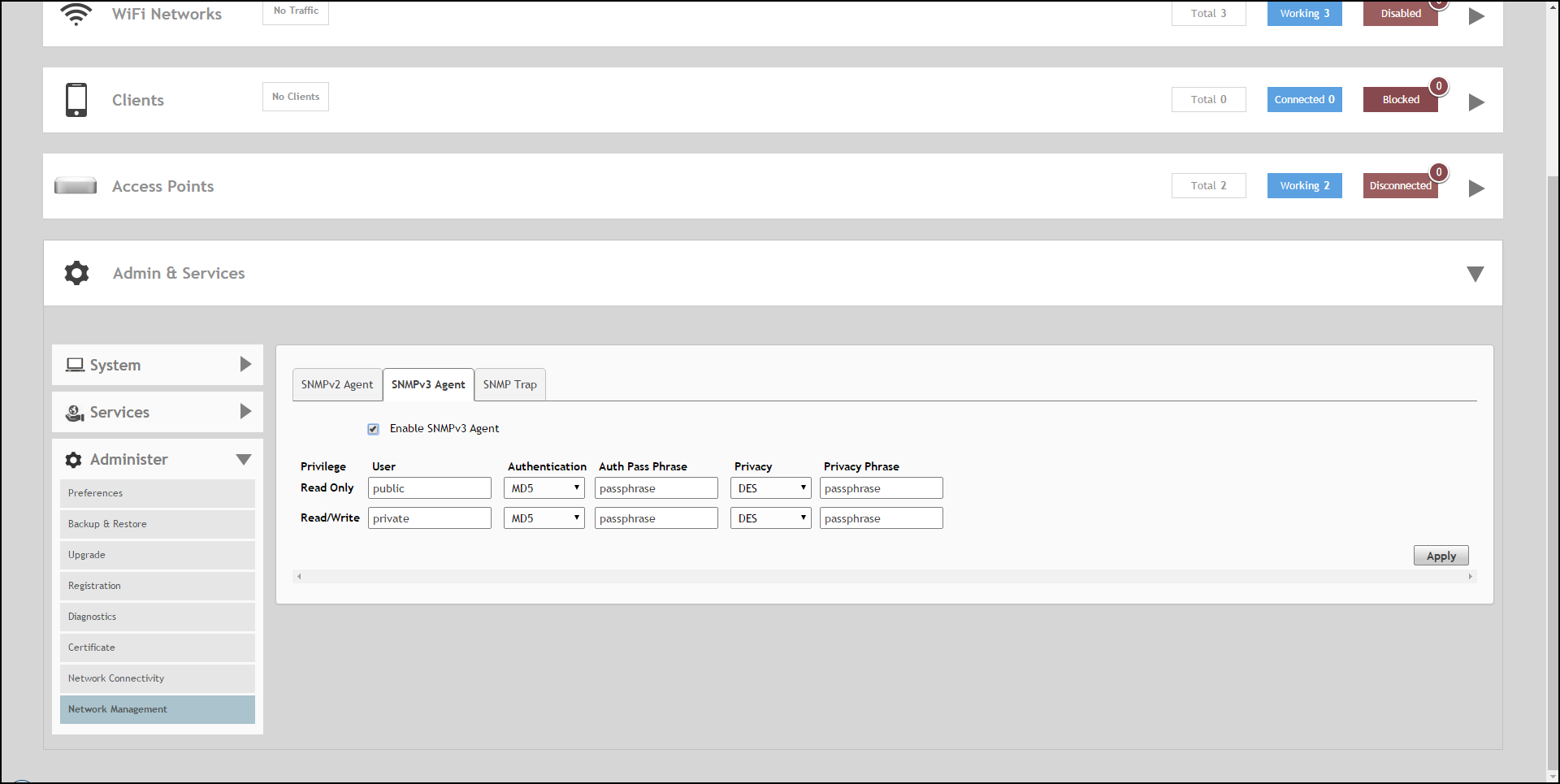
SNMPv3

Complete the following steps if your network uses SNMPv3.

  1. From the RUCKUS Unleashed dashboard, select Admin & Services > Administer > Network Management.
  2. On the SNMPv3 Agent tab, select the Enable SNMPv3 Agent check box.
  3. Enter the following information for both the Read Only and Read/Write privileges:
    • User: Enter a user name between 1 and 31 characters.
    • Authentication: Select one from the following authentication methods:
      • MD5 (Message-Digest algorithm 5): Message hash function with 128-bit output (Default).
      • SHA (Secure Hash Algorithm): Message hash function with 160-bit output.
    • Auth Pass Phrase: Enter a passphrase between 8 and 32 characters in length.
    • Privacy: Select one from the following options: DES, AES, or None.
      • DES (Data Encryption Standard) uses data block cipher.
      • AES (Advanced Encryption Standard) uses data block cipher.
      • None: No privacy passphrase is required.
      • Privacy Phrase: If DES or AES is selected, enter a privacy phrase between 8 and 32 characters in length.
  4. Click Apply to save your changes.

SNMPv3 Agent