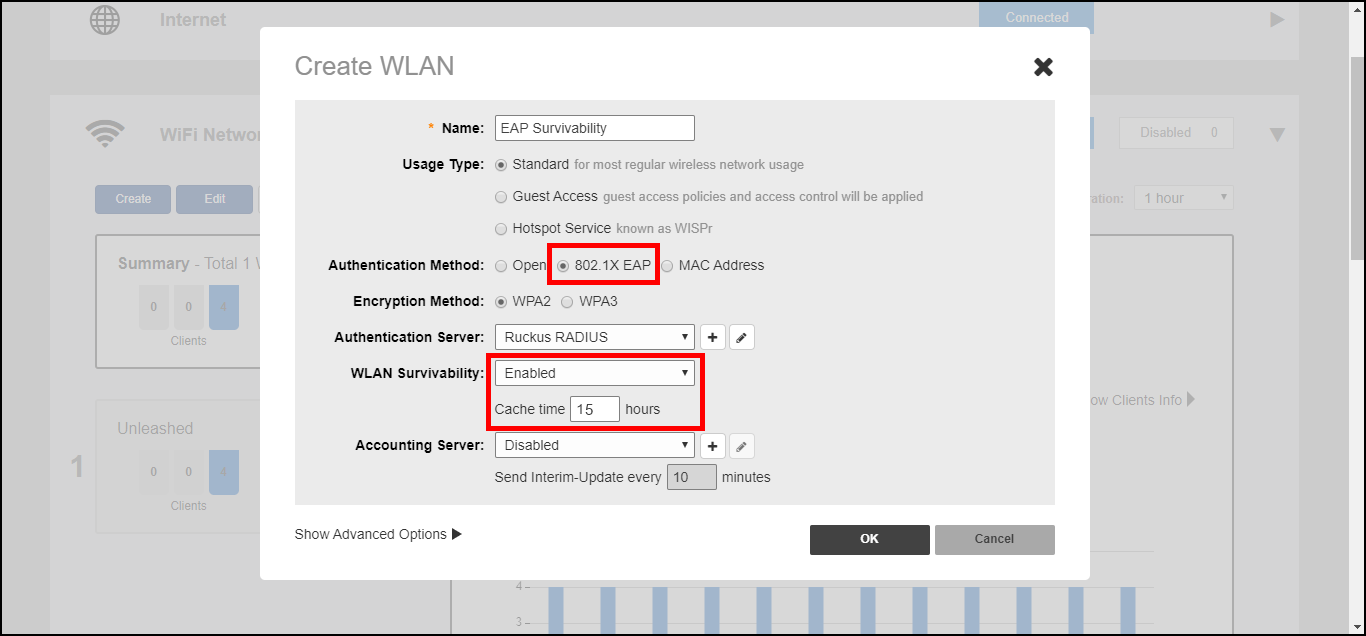
802.1X WLAN Survivability
The WLAN Survivability feature allows 8021X end users to continue to authenticate
successfully and access the internet even when the external RADIUS server is unreachable
for a configurable period of time.
With this feature enabled, the RUCKUS device caches the user's credentials for reuse in the event of disconnection from the AAA server.
Note: Enabling this feature on the Unleashed web
interface will not work unless the relevant configuration is also performed on
the
RADIUS server. This procedure assumes the reader has a high level of competence
in
RADIUS customization. Specifically, the user will need the ability to write scripts
or code to recognize our RUCKUS RADIUS attributes and respond with the correct
values by properly calculating the password and challenge strings.
To configure WLAN Survivability for 802.1X WLAN clients:
- Go to WiFi Networks > Create/Edit WLAN.
- In Usage Type, select Standard.
- In Authentication Method, select 802.1X EAP.
- In Authentication Server, select or create a new RADIUS server to authenticate with.
- In WLAN Survivability, select Enabled.
- In Cache Time, enter a value in hours (1-128) to cache the user credentials.
- Click OK to save your changes.
- The RUCKUS controller will send
the RADIUS request with the attribute:
RADIUS_RUCKUS_AUTH_SURVIVABILITY = 15after enabling the survivability feature. - The RADIUS server must have the capability of recognizing the request and answering
with the following attributes in the access-accept message:
RADIUS_RUCKUS_USER_NAME = 16 , /*Survivability-Usr-Name*/ RADIUS_RUCKUS_PASSWORD_NT_HASH
                     = 17 /*Survivability-MD5-NT-Passwd*/
. - How the RADIUS server calculates the two new attributes:
RADIUS_RUCKUS_USER_NAME: This is the user name created in the RADIUS server.RADIUS_RUCKUS_PASSWORD_NT_HASH: This is a 32 byte binary data value. RADIUS uses the following steps to create this attribute:- The server generates a Windows NT hash of the user’s password using the MS_CHAPv2 algorithm.
- It uses the first random 16 bytes as an authenticator and the shared secret to encrypt
the data generated by the previous step via MD5 as a user password does (refer to
RFC 2865, Chapter 5.2). The following is a code snippet of the user password encryption
algorithm:
struct radius_attr_hdr * radius_msg_add_attr_user_password(struct radius_msg *msg, TAC_U8 *data, size_t data_len, TAC_U8 *secret, size_t secret_len) { TAC_U8 buf[128]; int padlen, i, pos; MD5_CTX context; size_t buf_len; TAC_U8 hash[16]; if (data_len > 128) return NULL; memcpy(buf, data, data_len); buf_len = data_len; padlen = data_len % 16; if (padlen) { padlen = 16 - padlen; memset(buf + data_len, 0, padlen); buf_len += padlen; } MD5Init(&context); MD5Update(&context, secret, secret_len); MD5Update(&context, msg->hdr->authenticator, 16); MD5Final(hash, &context); for (i = 0; i < 16; i++) buf[i] ^= hash[i]; pos = 16; while (pos < buf_len) { MD5Init(&context); MD5Update(&context, secret, secret_len); MD5Update(&context, &buf[pos - 16], 16); MD5Final(hash, &context); for (i = 0; i < 16; i++) buf[pos + i] ^= hash[i]; pos += 16; } return radius_msg_add_attr(msg, RADIUS_ATTR_USER_PASSWORD, buf, buf_len); } - Replace
msg->hdr->authenticatorwith that first 16 bytes of random data. - Place the results into the second 16 bytes.
Note: This feature is unavailable when a Backup RADIUS server is configured.