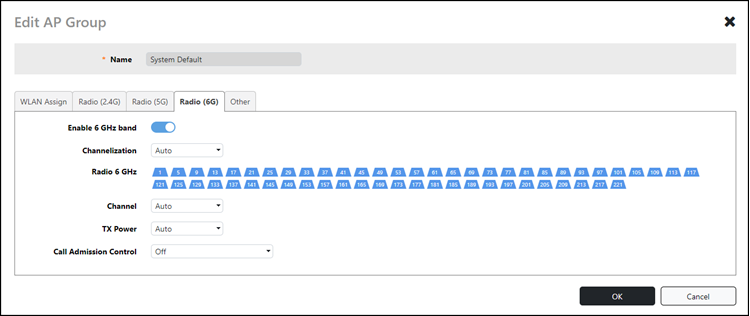
Radio (6G)

Navigating to the Radio (6G) tab for the System Default AP Group allows you to view and manage the following information:

Enable 6 GHz band Allows you to enable or disable 6 GHz radio settings on the third radio in these APs (default is Enabled).
Channelization Allows selection of channel width for the 6 GHz radios (Auto, 20, 40, 80, 160, or 320 MHz). Default setting is Auto (which is 160 MHz).
Radio 6 GHz Allows selection of the spectrum-specific channels from which to choose during the automatic channel selection process.
Channel Allows you to select a specific channel on which to operate. (Auto allows the system to choose the best available channel).
TX Power Allows you to manually set the transmit power on all 6 GHz radios.
  • Auto: Default setting that dynamically adjusts the transmit power of an AP based on real-time conditions
  • Full: Maximum allowable transmit power according to country regulations
  • Min: Minimum allowable transmit power according to country regulations
Call Admission Control Allows you to enable or disable Wi-Fi Multimedia Admission Control (WMM-AC) to support Polycom/Spectralink Voice Interoperability for Enterprise Wireless (VIEW) certification (disabled by default).

System Default AP Group: 6 GHz Radio Configuration