The Facebook social media login complies
with the OAuth 2.0 specification (the industry-standard protocol for authorization).
To create a Facebook social media WLAN, you need an OAuth 2.0 client ID and secret. RUCKUS Unleashed provides a default internal Facebook client ID.
Note: After upgrade to Unleashed 200.15, WLANs previously
configured to support only Facebook social media login will be disabled. WLANs
configured to support multiple authentication methods (such as guest pass and Facebook),
will still be enabled, but the Facebook option will be disabled. In either case,
you
must manually re-enable the Facebook option and configure a client ID and client
secret.
Complete the following steps to use Facebook social media login.
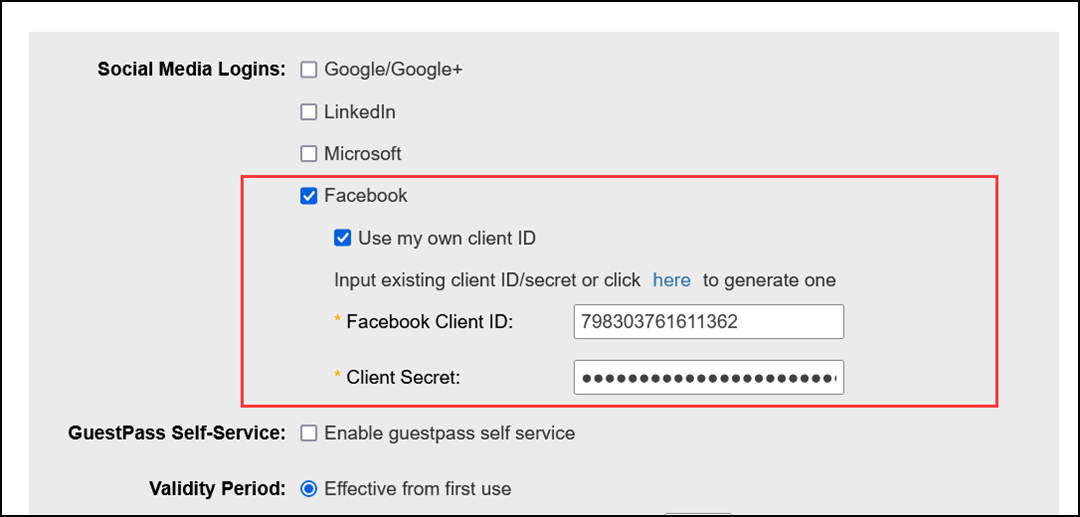
- For Social Media Logins, select the Facebook check box and the Use my own client ID option appears.
- You have two options for configuring the Facebook client ID:
- Leave the Use my own client ID option cleared if you want the system to use the default, built-in Facebook client ID.
- Click the Use my own client ID option and enter your
Facebook Client ID and Client
Secret.
Note: If you do not already have a Facebook Client ID and Client Secret, click the link in Click here to generate one to generate client ID and client secret. Refer to OAuth Setup Procedure for Facebook Social Media Login for more information.