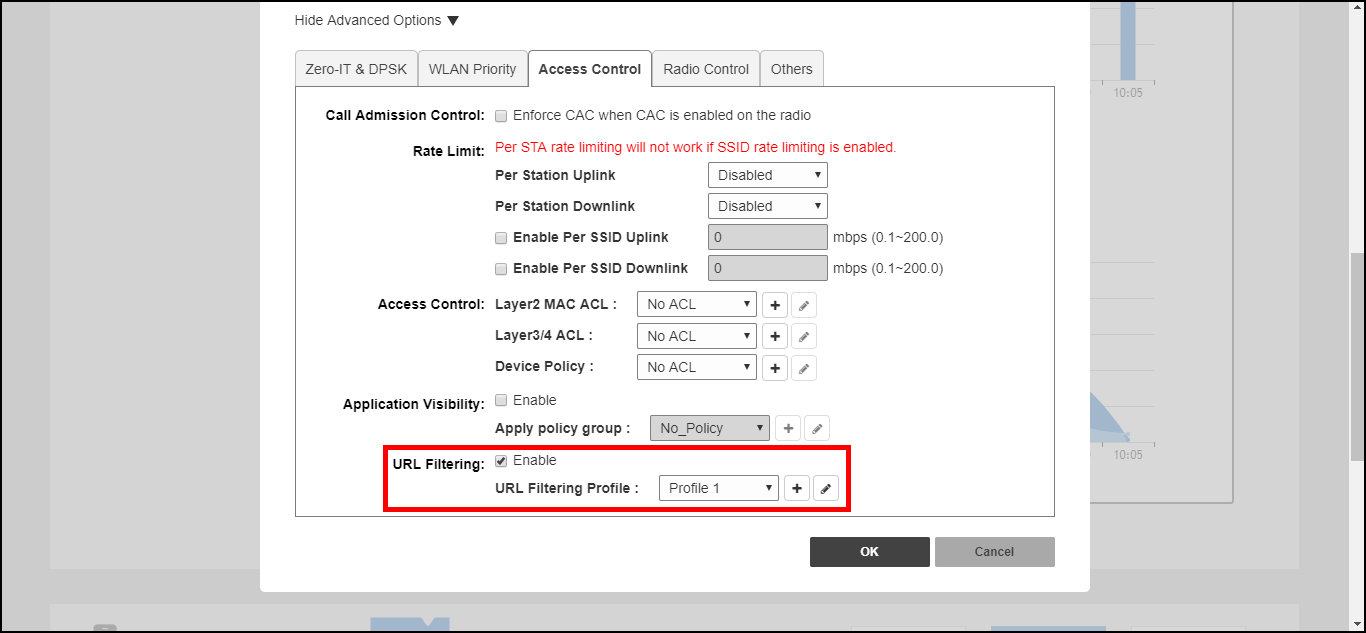
Applying a URL Filtering Policy to a WLAN

Once a URL filtering policy has been created, you can apply it to your wireless networks using the following procedure.

To apply a URL filtering policy to a WLAN:

  1. Go to WiFi Networks, select the WLAN you would like to configure, and click Edit.
  2. Scroll down and expand the Advanced Options section.
  3. Click the Access Control tab.
  4. In URL Filtering, select Enable and choose a URL Filtering Profile from the drop-down list.
    Alternatively, click the + (Create New) icon to create a new profile and apply it to this WLAN.
  5. Click OK to save your changes.

    Enabling URL filtering for a WLAN