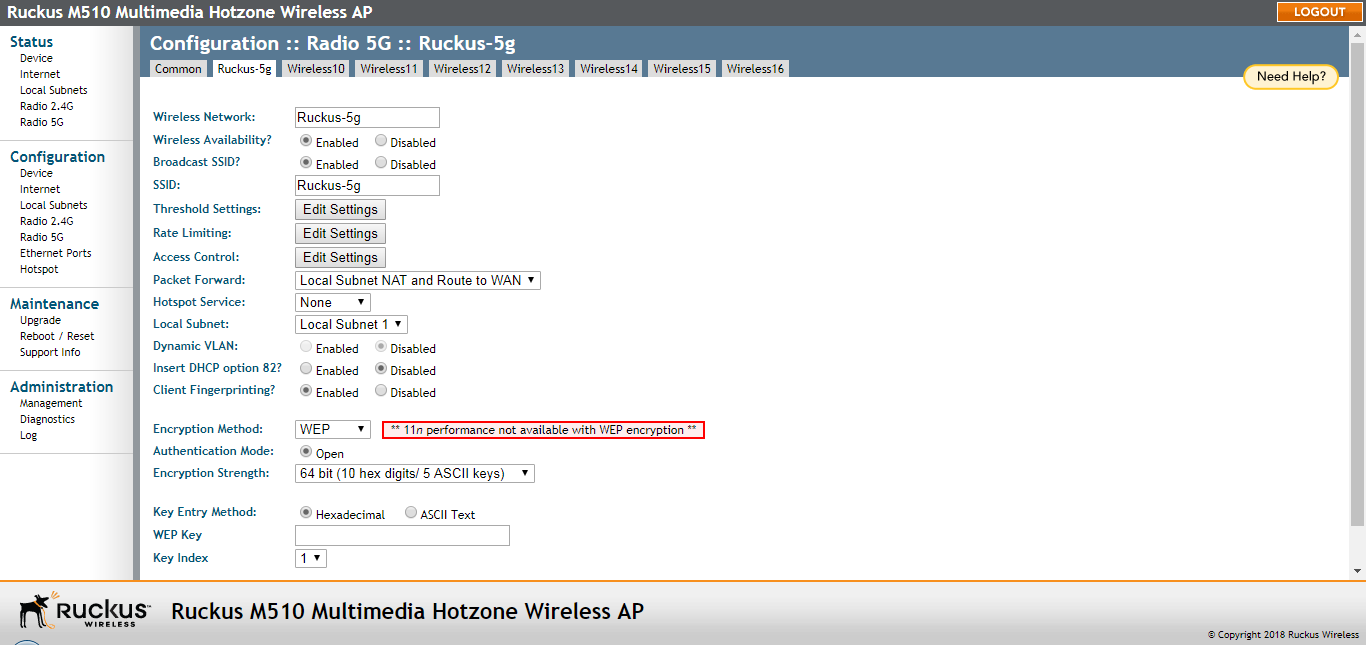
Using WEP
Wired Equivalent Privacy (WEP) is a security algorithm for 802.11 wireless networks
designed to provide data confidentiality comparable to that of a wired network.
Caution: WEP encryption is easily circumvented. Therefore, Ruckus recommends using WPA whenever
possible, and only use WEP if your client devices do not support WPA.
Caution: Using WEP encryption limits the performance of the WLAN to 802.11g rates. If you select
WEP encryption for a WLAN, wireless devices that are capable of faster transfer rates
are limited to 802.11g rates. Other WLANs are unaffected.
- Go to Configuration > Wireless or Configuration > Radio 2.4G or Configuration > Radio 5G. The Configuration > Wireless > Common page appears.
- Click the Wireless # (WLAN number) tab that you want to configure. The Configuration > Wireless > Wireless[#] page appears.
- Select WEP from the Encryption Method menu. An additional set of WEP-specific encryption options appear on this page.
- Review the encryption settings listed in the following table, and then make changes
as required.
WEP Options
- Click Update Settings to save and apply the changes. A confirmation message appears at the top of the page.
- Click Go back to Wireless Configuration to reopen the previous page.