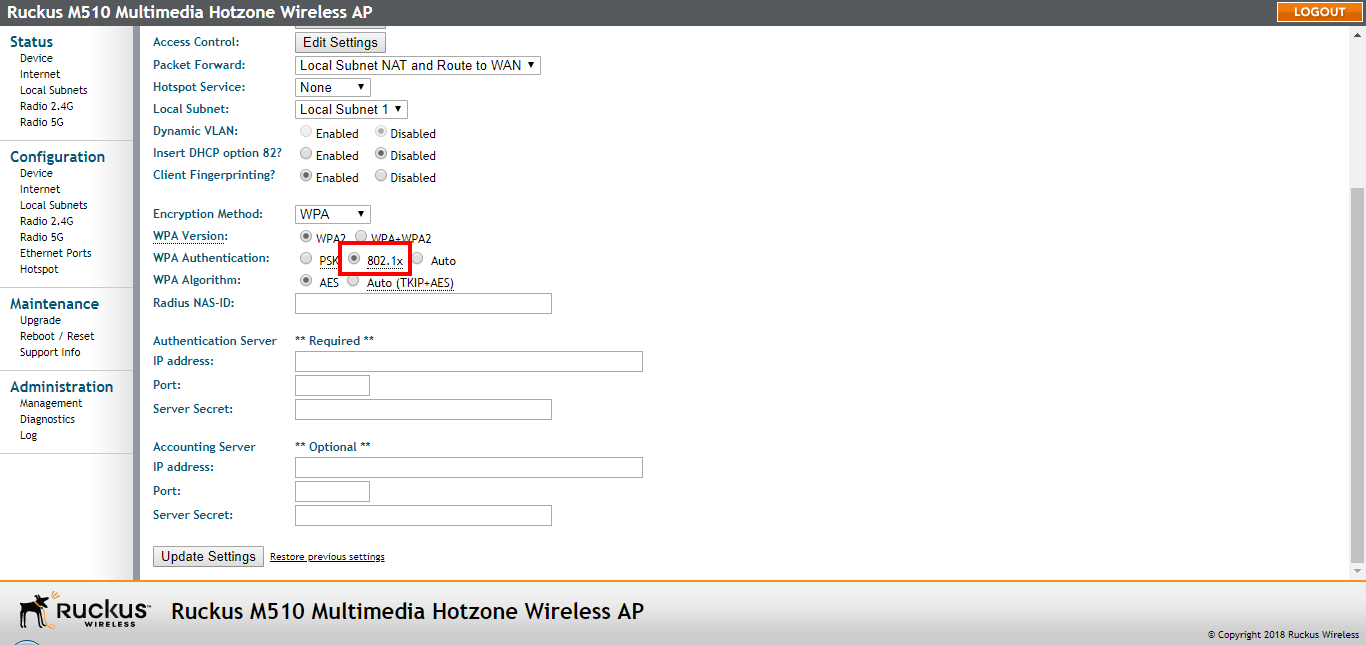
Customizing 802.1X Settings
If you choose WPA as the encryption method, you have the option to set up the AP to act as an 802.1X proxy, utilizing external authentication sources such as a RADIUS server.
In 802.1X authentication, the supplicant sends access request messages along with credentials, such as user name / password or digital certificate, to an authenticator, which forwards the credentials to the authentication server for verification. The supplicant (client device) remains in an unauthorized state until verification has been received. In unauthorized state, only 802.1X traffic is allowed; all other traffic, such as DHCP and HTTP traffic, is dropped. For its wireless interfaces, the AP can serve as the authenticator communicating between the supplicant and the authentication server.
- Go to Configuration > Radio 2.4G or Configuration > Radio 5G. The Configuration > Wireless > Common page appears.
- Click a Wireless # (WLAN number) tab to configure. The Configuration > Wireless > Wireless[#] page appears.
- From the Encryption Method menu, select WPA. The basic set of WPA-specific encryption options appears on the page.
- Select 802.1X as the WPA Authentication mode. Additional options appear.
- Configure the following settings to customize your 802.1X authentication:
- Click
Update Settings to save and apply the changes. A confirmation message appears at the top of this
page.
Note: Ruckus APs do not support arbitrary rate values for 802.1X clients (if client rate limiting attributes are configured on the RADIUS server). Ruckus APs support only those WLAN rate limiting values that can be set using the AP web interface. If the rate returned by the RADIUS server does not match one of these values exactly, it is approximated.