R850
Front View Features
The following figure shows the top view of the R850. For a description of the front panel LEDs, refer to the table below.
R850 Front Panel LEDs
Power Modes
AP R850 operates at full functionality under DC power, PoH or uPoE power. If a switch (or PoE injector) can only supply 802.3at power then R850 will operate with reduced functionality. On R850, there are two modes of operation possible when the R850is at 802.3at power.
- Mode 0 - Factory default, only 4 radio chains are enabled in the 5GHz band and the IoT radios are disabled.
- Mode 1 - R850 operates in 8x8:8 mode on 5GHz but the secondary 1Gbps ethernet port, USB and IoT radios are disabled.
Switching to Mode 1 can only be accomplishe through rkscli command. Once the switch is made to Mode 1, R850 will continue to operate in Mode 1 under 802.3at power across power-on resets. R850 will revert to Mode 0 only on a factory reset.
Rkscli command to switch to Mode 1
rkscli: set at-mode 1
Bottom Panel
The bottom panel of the R850 includes the following:
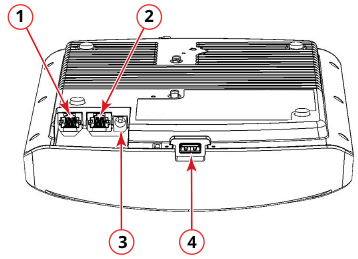
R850 Rear Panel Elements
| No. | Label | Description |
|---|---|---|
| 1 | 5G ETH PoE | 100/1000/5000 Mbps PoE In Port: RJ-45 Ethernet port (supports 802.3at/at+ PoE in)
Note: The PoE switch port must run link layer discovery protocol (LLDP) power over Ethernet/MDI
(PoE+) in order for the R850 to operate in full-power mode. This may require enabling
both LLDP and Power via MDI (dot3) on the switch, if available.
Note: The recommended PoE injector for the R850 is GRT-480125A (60W power rating and 1 Gbps
link speed). If using the recommended PoE injector, you must 1) manually select AT+
mode as the power mode in the SmartZone/ZoneDirector GUI, and 2) force 1Gbps link
speed on the switch.
|
| 2 | 1G ETH | 10/100/1000 Mbps port: RJ-45 Ethernet port (non-PoE) |
| 3 | 48 VDC | Connect a customer-ordered Ruckus DC power adapter (sold separately). When powered by the Ruckus power adapter, the AP supports a full feature set. |
| 4 | USB Port | USB Port for IoT devices. Max Dimensions: 6 cm x 2 cm x 1.1 cm. Interface: USB 2.0. Connector: USB Type-A plug. |