R710
The R710 has a USB port on its bottom panel. The USB port is intended for low-power devices such as BLE (Bluetooth low energy) beacons. The maximum power that the USB port can supply is 0.5W. Refer to AP Support for Bluetooth Low Energy Devices for more information.
The R710 can use the link aggregation control protocol (LACP) to control the bonding of two 1Gbps physical Ethernet ports together to form a single logical channel. Refer to Configuring Link Aggregation (LACP) for AP Backhaul for instructions on bonding the two Ethernet ports using LACP.
The R710 includes five LEDs on its front panel, and buttons and connectors on its bottom panel.
Front View Features
The following figure shows the top view of the R710. For a description of the front panel LEDs, refer to the table below.
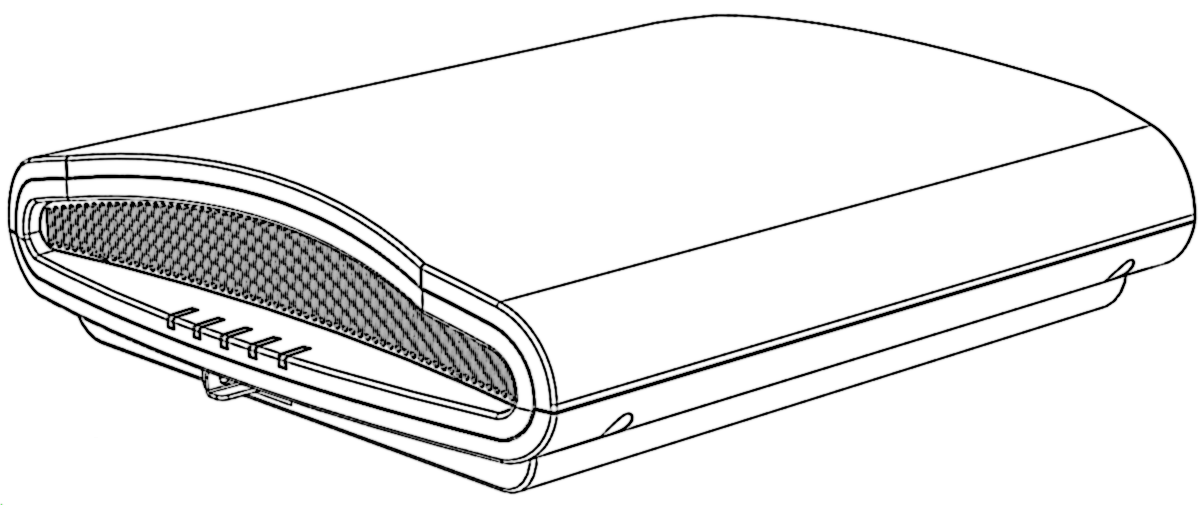
R710 front panel LEDs
Bottom Panel
The bottom panel of the R710 includes the following:
- one 10/100/1000 PoE In Ethernet port
- one 10/100/1000 Ethernet port
- one 12VDC 2A power socket
- one reset button
- one USB port
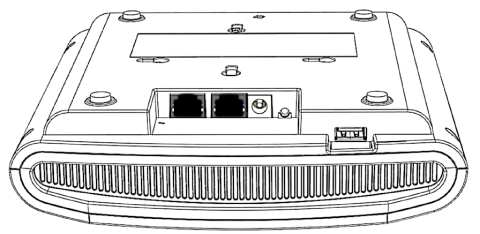
R710 Rear panel elements
| Label | Description |
|---|---|
| Ethernet (eth1) Port | RJ-45 port for a 10/100/1000 connection. |
| Ethernet + PoE (eth0) Port | RJ-45 port for a 10/100/1000 with PoE in.
Note: The R710 can be powered by a 802.3at-compliant (25.5W) Power over Ethernet (PoE) switch
or PoE injector. --OR-- an 802.3af-compliant PoE switch or PoE injector.
Caution: The AP can operate off of 802.3af power, but the feature set is reduced: the USB port
is disabled, the non-PoE (eth1) Ethernet port is disabled, and the 2.4 GHz radio is
reduced to two transmit streams (2x4 MIMO) with aggregate transmit power up to 22dBm
(subject to country limits).
Warning: For units using Power over Ethernet (PoE). These products and all interconnected equipment
must be installed indoors within the same building, including the associated LAN connections,
as defined by Environment A of the IEEE 802.3af Standard.
|
| 12V 2A Power Socket | Connect a customer-ordered Ruckus Wireless 12VDC 902-1169-xx00 AC power adapter (sold
separately). When powered by the 902-1169-xx00 power adapter, the R710 supports a
full feature set.
Note: Power can alternately be supplied via the Ethernet + PoE port.
|
| RESET Button | Pressing, and then quickly releasing this internal button reboots the AP. Pressing
and holding it for six seconds resets the AP to factory default settings.
Note: Resetting the AP to factory default settings erases all settings that you configured
previously.
|
| USB Port | The R710 can have a low-power (0.5W or less) customer-supplied USB device plugged in. The USB device is hidden after the R710 is attached to its mounting base. |
Ethernet Port LEDs
Behavior of Ethernet port LEDs on the R710
| LED | Description |
|---|---|
| Off | Not connected |
| Amber + Green | Connected to 10Mbps device |
| Amber | Connected to 100Mbps device |
| Green | Connected to 1000Mbps device |
R710 Power Modes
The following table lists the R710's power modes and the corresponding feature set under the different power modes. When both power sources are available on an AP, then DC power will take priority and override PoE power. When the AP is connected to a PoE switch the max power requested by the AP is captured in the second column, and rest of the columns describe the operational capability for each mode.