R320

The R320 is an entry level two-stream, dual-band, 802.11a/b/g/n/ac Access Point.
Note: The minimum software revision for the R320 is SmartZone 5.1 new AP model or later, ZoneDirector 10.2.1 native or later or Unleashed 200.7 or later.

Front View Features

The R320 includes five LEDs on its front panel and buttons and connectors on its rear panel.
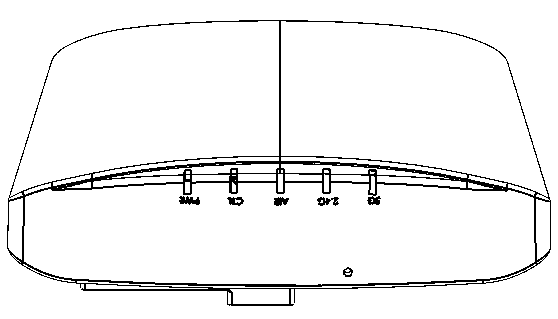
R320 front view

R320 front panel elements

LED Description
PWR LED
  • Off: Off.
  • Red: Boot up in process.
  • Flashing Green: No routable IP address
  • Green: On.
CTL LED
  • Off: The AP is not being managed by a controller (standalone mode).
  • Green: The AP is being managed by a controller.
  • Slow flashing green (one flash every two seconds): The AP is being managed by a controller, but is currently unable to communicate with the controller.
  • Fast flashing green (two flashes every second): The AP is being managed by a controller and is currently receiving configuration settings (provisioning) or an image update.
AIR LED
  • Off: The AP is operating in standalone mode or operating as a root AP (RAP) or a non-mesh AP
  • Green: The AP is functioning as a Mesh AP (MAP), and the wireless signal to its uplink AP is good.
  • Slow flashing green (one flash every two seconds): Mesh networking is enabled, but the AP is still searching for a mesh uplink.
  • Fast flashing green (two flashes every second): The AP is functioning as a Mesh AP (MAP), and the wireless signal to its uplink AP is fair.
2.4G LED (WLAN)
  • Off: The WLAN service is down.
  • Green: The WLAN service is up and at least one client is associated.
  • Amber: The WLAN service is up and no clients are associated.
5G LED (WLAN)
  • Off: The WLAN service is down.
  • Green: The WLAN service is up and at least one client is associated.
  • Amber: The WLAN service is up and no clients are associated.

Rear Panel Features

The rear panel of the R320 includes one 10/100/1000 PoE Ethernet port, power socket and reset button. See the table below for a description of each rear panel part.
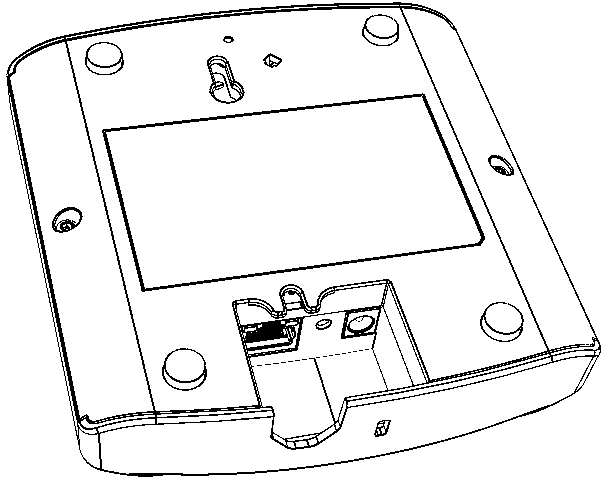
R320 rear panel

R320 bottom panel elements

Item Name Description
10/100/1000+PoE Port One RJ-45 port for a 10/100/1000 PoE (Power over Ethernet, 802.3af) connection.
RST Button Pressing, and then quickly releasing this internal button reboots the AP. Pressing and holding it for six seconds resets the AP to factory default settings.
Note: Resetting the AP to factory default settings erases all previously configured settings.
Power Connect the power adapter (12 VDC/1A DC) to this socket. Power can also be supplied via the 10/100/1000 PoE port.