Enabling Other Management Access Options
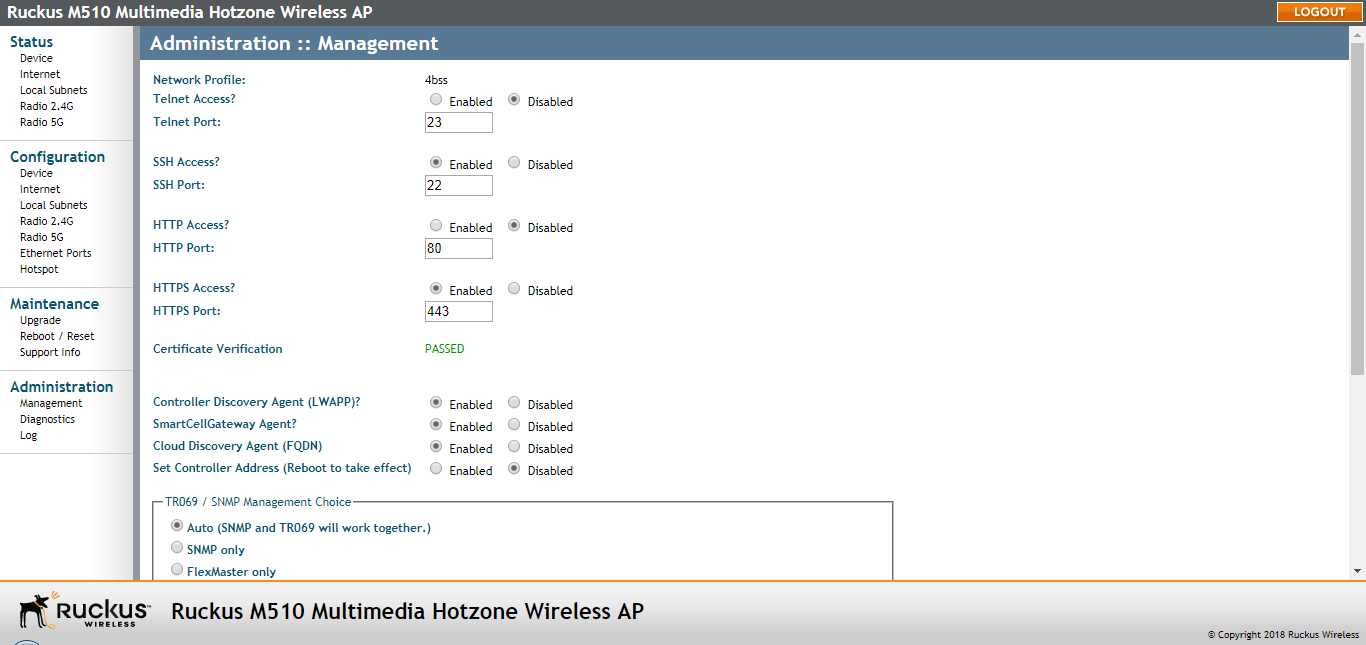
Use the Administration > Management page to configure AP management options.
In addition to managing the AP via a web browser through HTTPS, several other management access options are available on the AP. These options include management access via HTTP, Telnet, and SSH.
You can also view and set up the connection to a Ruckus FlexMaster (UMM) server under the TR-069/SNMP Management Choice options.
Note: If you are configuring the AP to be managed by FlexMaster, remember to point it to
the FlexMaster server after you configure the management access options. For more
information, refer to
Viewing FlexMaster Management Status.
- Go to Administration > Management. The Management page appears.
- Review the access options listed in the following table, and then make changes as
needed.
Management Access Options
Option Description Telnet Access By default, this option is disabled (inactive). Telnet Port This field lists the default Telnet port of 23 — only if Telnet is active. You can manually change this port number, if required. SSH Access By default, this option is enabled (active). SSH Port This field lists the default SSH port of 22—only if SSH is active. You can manually change this port number if required. HTTP Access This option is disabled by default. HTTP Port This field lists the default HTTP port of 80, if HTTP is enabled. You can manually change this port number if required. HTTPS Access By default this option is enabled. This connection mode requires a security certificate, a copy of which has been pre-installed in the device. HTTPS Port This field lists the default HTTPS port of 443—only if HTTPS has been activated. You can manually change this port number if required. Certification Verification This notes whether the security certificate linked to the HTTPS settings has been passed or not. Controller Discovery Agent (LWAPP) Cloud Discovery Agent (FQDN) Set Controller Address - Enabled -- The AP uses an IP address to search for the primary and/or secondary controller. When Set Controller Address is Enabled, enter the required primary controller IP address and the optional secondary controller IP address.
- Disabled (default) -- The AP does not use IP address(es) to search for SCG, SZ, vSZ or ZD controllers.
PoE Operating Mode (some APs) AUTO: Allow the AP to decide if it is to operate in 802.3at or 802.3af PoE mode, 802.3af PoE: Force the AP to operate in 802.3af mode.
Default = AUTO.
Note: As described in the R710 section, some APs can operate off of 802.3af power, but the feature set is reduced.Primary and Controller Addr Refer to Set Controller Address above. - To enable TR-069 or SNMP for remote management, configure the settings in the following
table.
TR-069 and SNMP Management Options
Option Description Auto Enables the Ruckus device to be managed by either SNMP server or FlexMaster server (UMM). SNMP only Allow SNMP management only. FlexMaster only Allow TR-069 management only. DHCP Discovery URL of server providing DHCP. FlexMaster Server URL URL of the FlexMaster server. Digest-authentication Username/Digest-authentication password This information is automatically generated by the AP and used for authentication with FlexMaster. Change this value only if you want the AP to connect to another access control server (ACS). Periodic FlexMaster Inform Interval Interval at which the device should attempt to contact FlexMaster. Default = 15 minutes. - Click Update Settings to save your changes. A confirmation message appears at the top of the page.
Note: Remember to open any relevant firewall ports between the AP and the firmware upgrade/management
server. For example, if HTTPS is used for firmware upgrades, open TCP port 443 on
the firewall to allow connections through port 443. If FlexMaster server is used,
open TCP ports 80 and 443 for HTTP/HTTPS communications, and TCP port 8082 for AP
wake-up commands.