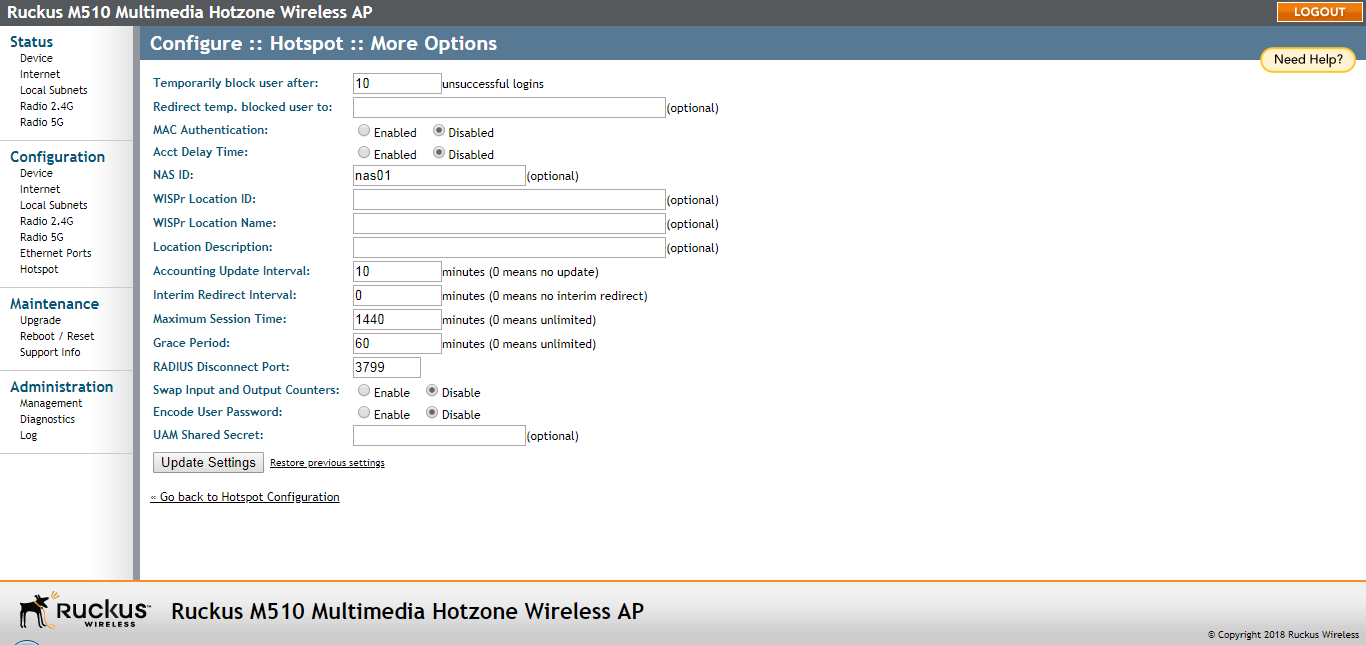
| Temporarily block user after __ unsuccessful login attempts
|
Specify the maximum number of repeated authentication failures allowed.
|
| Redirect temp. blocked user to
|
Enter a redirect URL to which blocked users are redirected.
|
| MAC Authentication
|
If enabled, the Hotspot service attempts to authenticate users based on their MAC
addresses if the local Hotspot authentication has failed. If enabled, an optional
MAC authentication password can be entered. If no password is specified, the system
uses the client’s MAC address as the password.
|
| Acct Delay Time
|
This attribute indicates how many seconds the client has been trying to send this
record for, and can be subtracted from the time of arrival on the server to find the
approximate time of the event generating this Accounting-Request. When enabled, this
attribute appears in accounting request packets with a starting value of “0”, incremented
each retry packet. When disabled, this attribute is not included in any accounting
request packet.
|
| NAS ID
|
Specify the Network Access Server identifier of this device. The NAS-ID attribute
is sent in RADIUS access and accounting request messages. It can also be used as location
identification when NAS-IP-Address cannot be used for this purpose.
|
| WISPr Location ID
|
Specify the Hotspot location identifier. This value is provided in the RADIUS access
and accounting requests. It is recommended that the value is in the form of
“isocc=<ISO_Country_Code>,
cc=<E.164_Country_Code>,
ac=<E.164_Area_Code>,
network=<SSID/ZONE>
”.
|
| WISPr Location Name
|
Specify the hotspot location and operator's name. This value is provided in the RADIUS
access and accounting requests. It is recommended that the value is in the form of
“<HOTSPOT_OPERATOR_NAME>, <Location>” .
|
| Location Description
|
Specify the description of location. This value is provided in the HTTP redirection.
|
| Accounting Update Interval
|
Specify the interval for RADIUS accounting requests.
|
| Interim Redirect Interval
|
Specify the interval after which users are redirected to the login URL.
|
| Maximum Session Time
|
Enter the maximum session time in minutes.
|
| Grace Period
|
Specify the maximum time that a user may disconnect from the Hotspot service and return
without the need to login again.
|
| RADIUS Disconnect Port
|
UDP port to listen to for accepting RADIUS disconnect requests.
|
| Swap Input and Output Counters
|
Swap the value of input counters (packets, octets and giga words) and output counters
in RADIUS accounting requests. This option is mainly for backward compatibility with
existing ChilliSpot deployments.
|
| Encode User Password
|
Encode user password with challenge string, if UAM secret is not specified; otherwise,
encode user password with both challenge string and UAM secret.
|
| UAM Shared Secret
|
The UAM Shared Secret is the shared secret between this AP and the HTTP server for
the Redirection URL. This setting is optional.
|