The C110 is a dual-band concurrent, 802.11ac Wave 2, wall plate mountable DOCSIS/EuroDOCSIS
3.0 Cable Modem Access Point (CMAP).
The C110 is a Wave 2 802.11ac (MU-MIMO capable) Wi-Fi Access Point with support for
DOCSIS 3.0 backhaul. The C110 comes in a convenient wall-plate form factor for easy
installs.
The C110 has an Ethernet switch with two 10/100Mbps Ethernet ports that can be used
to connect a range of wired network devices such as IP telephones and networked minibars
while simultaneously providing dual-band 802.11ac wireless LAN coverage. The C110
is powered by an external 12V DC power supply, and can be deployed as a standalone
device or centrally managed by SmartZone or ZoneDirector management platforms.
The C110 can supply power to USB devices through its USB port on the bottom of the
unit.
Note: The USB port is intended for low-power devices such as BLE (Bluetooth low energy)
beacons. The maximum power that the USB port can supply is 0.5W.
The C110 includes seven LEDs on its bottom panel, and power and coaxial cable connectors
on its rear panel.
Front View
C110 front view
Rear/Bottom View Features
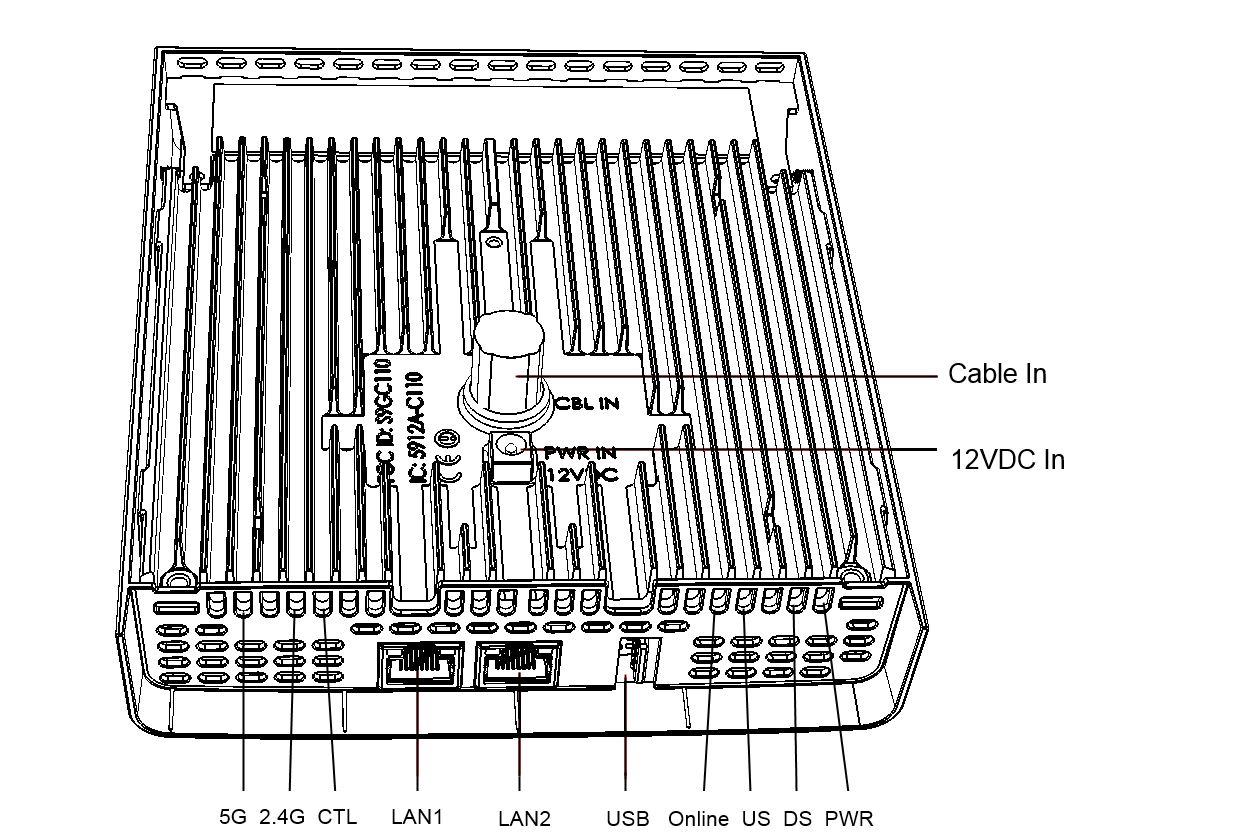
The following figure shows the rear and bottom view of the C110. For a description
of each rear/bottom panel element, refer to the table below.
C110 rear/bottom view
C110 bottom/rear panel elements
Label
Description
CBL IN
Cable In Port: Uplink coaxial cable connector.
PWR IN
12VDC In power connector.
PWR
Power LED:
Off: Off.
Red: Boot up in process.
Flashing Green: No routable IP address
Green: On.
CTL
Controller LED:
Off: The AP is not being managed by a controller (standalone mode).
Green: The AP is being managed by a controller.
Slow flashing green (one flash every two seconds): The AP is being managed by a controller,
but is currently unable to communicate with the controller.
Fast flashing green (two flashes every second): The AP is being managed by a controller
and is currently receiving configuration settings (provisioning) or an image update.
2.4G
2.4G Radio LED:
Off: The WLAN service is down.
Green: The WLAN is up and at least one client is associated.
Amber: The WLAN is up. No clients are associated.
5G
5G Radio LED:
Off: The WLAN service is down.
Amber: The WLAN is up, but no clients or downlink MAPs are associated/connected.
Green: The WLAN is up and at least one client is associated. No downlink MAPs are
connected.
Slow flashing green (one flash every two seconds): The WLAN is up and at least one
downlink MAP is connected. No clients are associated.
Fast flashing green (two flashes every second): The WLAN is up, at least one downlink
MAP is connected, and at least one client is associated.
Online
Online LED:
Green: Indicates connection to the CMTS is established.
US
Upstream LED:
Green: Indicates the CM upstream connection is established.
DS
Downstream LED:
Green: Indicates the CM downstream connection is established.