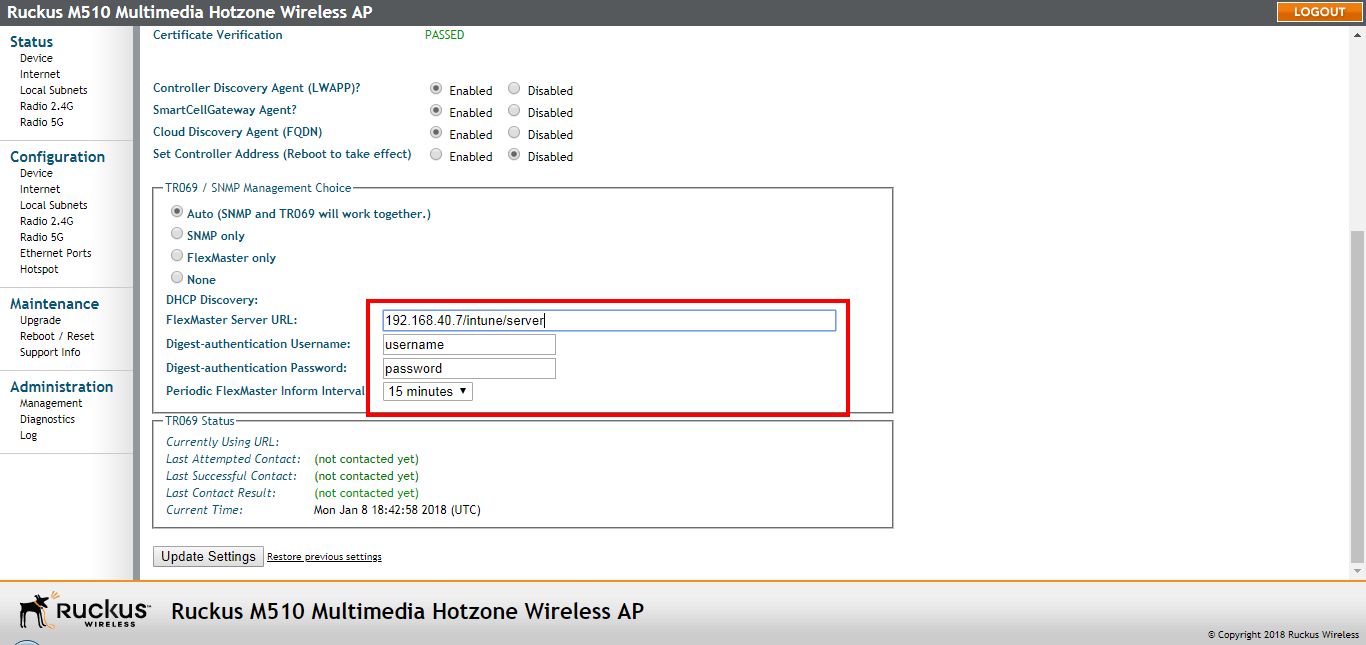
Pointing the AP to FlexMaster
Use the following procedure to configure the AP for FlexMaster (UMM) management.
Your Ruckus device is required to "call home" to register with your FlexMaster server; FlexMaster does not initiate initial contact. To register successfully with FlexMaster, your Ruckus device must know the FlexMaster server's URL. Additionally, you will need to ensure that TCP ports 80 and 443 are open between APs and FlexMaster when traversing Layer 3/firewall boundaries.
- Go to Administration > Management.
- Under TR-069/SNMP Management Choice, click Auto.
- In FlexMaster Server URL, type the URL of the FlexMaster server.
- Toggle the Periodic FlexMaster Inform Interval drop-down list to select how frequently the device checks the FlexMaster server for any pending configuration changes available for that Ruckus Wireless unit. On the FlexMaster side, this field is referred to as the Periodic Inform Interval.
- Click Update Settings to save your changes.