Using 802.1X EAP + MAC Address Authentication
Complete the following steps to configure a WLAN for 802.1X EAP MAC authentication.
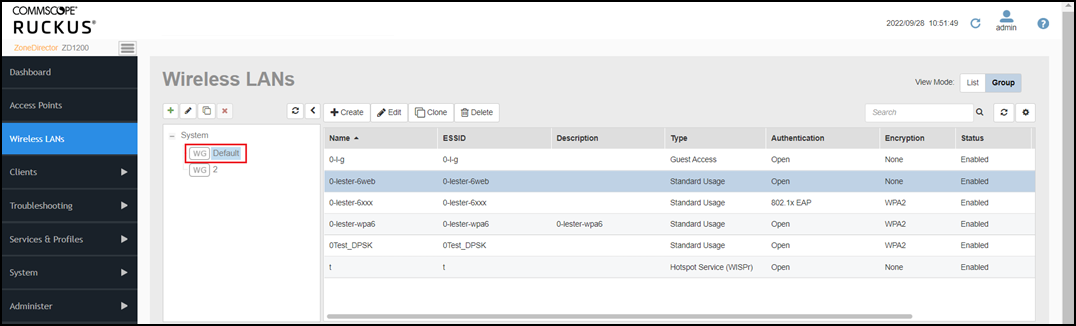
- Go to and select a WLAN group from the left pane.
The WLAN table displays all the WLANs created in that group in ZoneDirector.
- Select the WLAN that you want to configure and click Edit (or click Create to create a new WLAN, refer to Creating a Wireless LAN).
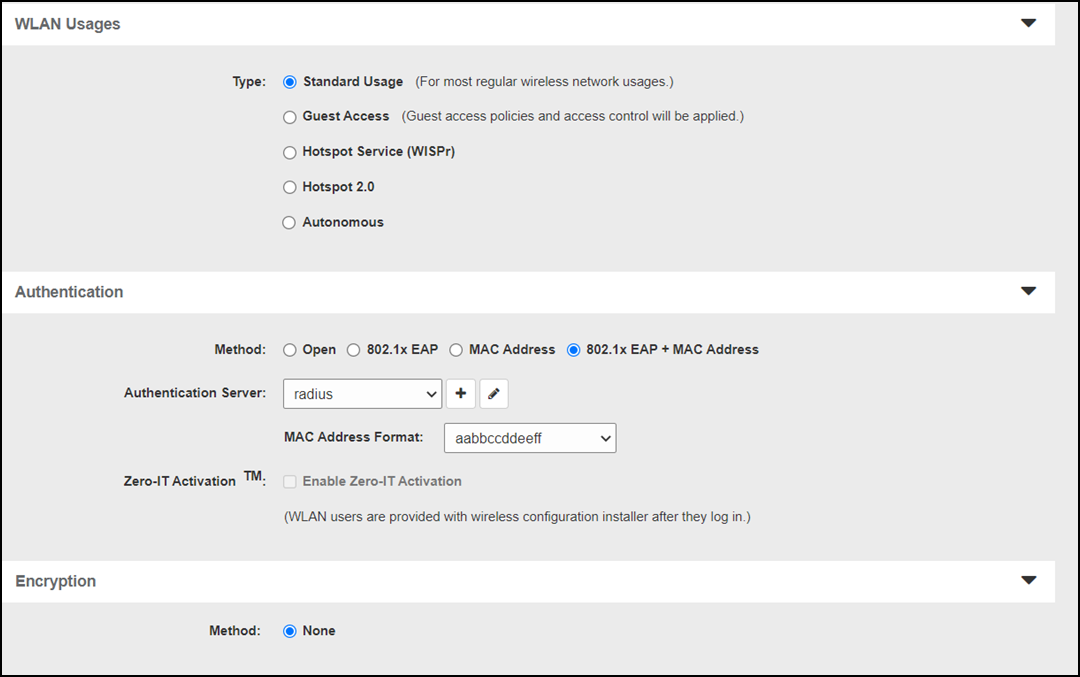
- Under WLAN Usages, for Type, select Standard Usage.
- Under Authentication, for Method, select 802.1X EAP + MAC Address.
- For Authentication Server, select a previously configured external RADIUS server (). Alternatively, click the Create New (+) icon to create a new AAA server object from within the WLAN configuration window.
- Under Encryption, for Method, select None.
- Click OK to save your changes.
When ZoneDirector authenticates a client, MAC authentication is checked first followed by the EAP authentication process. When the client tries to associate, if MAC authentication succeeds, the client is authorized directly and allowed to pass traffic without any further EAP authentication required.
If MAC authentication fails, the EAP authentication process begins and the client must provide a valid EAP account before access is granted.
You can view the actual authentication method used (MAC address or EAP) from the Clients > Wireless Clients page.